Bharti Airtel Broadband and Telephone Services (B&TS), and Google have
teamed-up to bring Web-based services to Airtel Broadband Internet customers.
As per the agreement, Airtel will offer it's Broadband customers a portal that includes Google search; Gmail with 2GB storage; spam filter and Web access and POP access; Google Talk IM/chatting service; Google docs and spreadsheets; on-demand gaming and music download service; and advanced utility/communication applications such as NetXpert, desktop and Internet security services, etc.
Airtel customers will also get to personalize their Internet start page with preferred content, including news, blog postings, weather, etc through Google 'Gadgets'. With access to the portal, customers will be able to better access their email or search the Web or connect with friends.
And all services will be able to be accessed with a single sign-on, completely free-of-cost.
Atul Bindal, president of Airtel Broadband and Telephone Services, said, "By offering an enhanced broadband experience to our customers that is powered by Google, Airtel strengthens its commitment to innovation and collaboration. With this partnership, we are moving a step ahead on our 'three screen philosophy' where we target meeting the infotainment needs of our consumer on the three screens of his TV, PC, and mobile."
Shailesh Rao, managing director of Google India, said, "Google is committed to enriching the online experience of users in India. We are delighted to work with Airtel to promote the use of Google services amongst its broadband users."
courtesy: http://www.techtree.com/India/News/Airtel_Broadband_Users_Get_Google/551-82653-613.html
Thursday, August 09, 2007

Wednesday, February 14, 2007
Wimdows Vista Extremely superb
Why Vista is Superb ?
1. It makes using your PC a breeze
Windows Vista features a breakthrough design and easy-to-use organizational tools that make it simpler to get things done and get on with life! Find what you need instantly, on your PC or on the web, with Instant Search. Bring more clarity to your tasks with the spectacular Windows Aero user experience and Windows Flip 3DA, allowing you to see everything you're working on at a glance.
2. Because all of your music is just a remote control click away
Navigate and play your music collection with just the click of a remote control! Windows Media Center and a compatible remote controlM let you quickly search and select tracks visually by album art, or by artist, album title, song, year, or genre. Share your Media Center screen and remoteM and give everyone the chance to mix and play their favorites.
3. It's the safest version of Windows ever
Windows Vista provides better protection for your PC, your personal information, and your family than any previous version of Windows—with new security tools like Windows Defender, anti-spam and phishing filters, and Parental Controls. Automatic backups, Performance Self-Tuning, and built-in diagnostics help you keep your data protected and your PC running smoothly.
4. See your world in a whole new light
The breakthrough design of the Windows AeroA user interface brings new clarity to your PC experience. With spectacular visual effects, like translucent glass-like menu bars that let you see behind your application window, you're one click away from everything you're working with.
5. It can find your stuff
All-new search and organization tools in Windows Vista will help you quickly find what you need on your hard drive or on the web. Instantly find and launch a document, photo, e-mail, song, video, file, or program on your PC with Instant Search.
6. Because you're always on the run
Windows Vista offers new mobility features that let you stay productive and entertained on the go. Windows Mobility Center, Network and Sharing Center, and Sync Center help you stay connected and keep your PC and portable devices up to date with your latest calendar, contacts, and music. Choose an ultra-light Tablet PCA and use a digital pen to handwrite notes or make sketches on the run. Take a break and enjoy your favorite TV shows, movies, music, and games wherever you find yourself, with Windows Media CenterM on your notebook PC.
7. Because you can freeze time
Organize a lifetime of photos and home movies with ease using Windows Photo Gallery. Tag your photos by date, keyword, star rating, or any identifying label you choose—so you can find them when you want them.
8. Your PC can take care of itself
Performance Self Tuning, Self-Healing technologies, Built-in Diagnostics, and repair tools keep your computer running at its best and provide automatic fixes, so you can spend less time dealing with problems and enjoy a more reliable PC experience.
9. Unchain your mobile PC
Network and Sharing Center lets you set up a wireless networkN at home so you can experience the freedom of working from your living room, backyard, or anywhere in your home.
10. Surf more safely
Dynamic Security Protection in Windows Internet Explorer 7 helps protect your PC and your personal information when you're online. Internet Explorer 7 also includes many new features designed to help protect you against malware.
For more information refer to:
http://www.microsoft.com/windows/products/windowsvista/100reasons.mspx
where you can find 100 reasons to choose Windows Vista.
1. It makes using your PC a breeze
Windows Vista features a breakthrough design and easy-to-use organizational tools that make it simpler to get things done and get on with life! Find what you need instantly, on your PC or on the web, with Instant Search. Bring more clarity to your tasks with the spectacular Windows Aero user experience and Windows Flip 3DA, allowing you to see everything you're working on at a glance.
2. Because all of your music is just a remote control click away
Navigate and play your music collection with just the click of a remote control! Windows Media Center and a compatible remote controlM let you quickly search and select tracks visually by album art, or by artist, album title, song, year, or genre. Share your Media Center screen and remoteM and give everyone the chance to mix and play their favorites.
3. It's the safest version of Windows ever
Windows Vista provides better protection for your PC, your personal information, and your family than any previous version of Windows—with new security tools like Windows Defender, anti-spam and phishing filters, and Parental Controls. Automatic backups, Performance Self-Tuning, and built-in diagnostics help you keep your data protected and your PC running smoothly.
4. See your world in a whole new light
The breakthrough design of the Windows AeroA user interface brings new clarity to your PC experience. With spectacular visual effects, like translucent glass-like menu bars that let you see behind your application window, you're one click away from everything you're working with.
5. It can find your stuff
All-new search and organization tools in Windows Vista will help you quickly find what you need on your hard drive or on the web. Instantly find and launch a document, photo, e-mail, song, video, file, or program on your PC with Instant Search.
6. Because you're always on the run
Windows Vista offers new mobility features that let you stay productive and entertained on the go. Windows Mobility Center, Network and Sharing Center, and Sync Center help you stay connected and keep your PC and portable devices up to date with your latest calendar, contacts, and music. Choose an ultra-light Tablet PCA and use a digital pen to handwrite notes or make sketches on the run. Take a break and enjoy your favorite TV shows, movies, music, and games wherever you find yourself, with Windows Media CenterM on your notebook PC.
7. Because you can freeze time
Organize a lifetime of photos and home movies with ease using Windows Photo Gallery. Tag your photos by date, keyword, star rating, or any identifying label you choose—so you can find them when you want them.
8. Your PC can take care of itself
Performance Self Tuning, Self-Healing technologies, Built-in Diagnostics, and repair tools keep your computer running at its best and provide automatic fixes, so you can spend less time dealing with problems and enjoy a more reliable PC experience.
9. Unchain your mobile PC
Network and Sharing Center lets you set up a wireless networkN at home so you can experience the freedom of working from your living room, backyard, or anywhere in your home.
10. Surf more safely
Dynamic Security Protection in Windows Internet Explorer 7 helps protect your PC and your personal information when you're online. Internet Explorer 7 also includes many new features designed to help protect you against malware.
For more information refer to:
http://www.microsoft.com/windows/products/windowsvista/100reasons.mspx
where you can find 100 reasons to choose Windows Vista.
Sunday, October 15, 2006
VoiceOver Accessibility interface
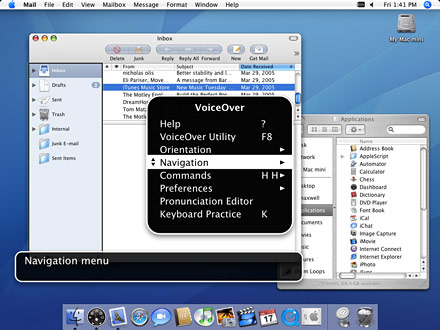
Mac OS X Tiger introduces VoiceOver, an accessibility interface that offers you magnification options, keyboard control and spoken English descriptions of what’s happening on screen. If you have a visual impairment, VoiceOver enables you to work collaboratively with other Mac users or work on their computers without assistance.
VoiceOver reads aloud the contents of files including web pages, Mail messages and word processing files, provides a comprehensive audible description of your workspace and includes a rich set of keyboard commands that allow you to navigate the Mac OS X interface and interact with application and system controls.
VoiceOver provides many of the features found in popular, add-on screen reader applications.
VoiceOver Accessibility Interface is Fully integrated and extraordinarily reliable.
Learning Through Exploration as VoiceOver is built right into Mac OS X, it works together with all of the key commands and shortcuts.
For more information visit:
http://www.apple.com/macosx/features/voiceover/
Tuesday, April 25, 2006
Popular browsers are fear of Bugs

Unpatched flaws in three popular browsers could make the Web a more dangerous place to surf, security experts have warned.
Researchers have published the alerts and details on the bugs in the Internet Explorer browser (Microsoft), Safari Browser(Apple Computer)and Mozilla's Firefox to security mailing lists over the weekend. The Firefox and Safari bugs could cause the browsers to crash, while the IE hole could be exploited to hijack a vulnerable Windows computer, Secunia said in advisories on its Web site.
The researchers have reported that the bug is named as hunter Michal Zalewski as a most Critical bug in Internet Explorer. The problem has been confirmed on version 6 of the popular software, but could also affect other versions.
The alerts come just days after security researcher Tom Ferris reported several unpatched holes in Apple software including Safari. Also, Microsoft earlier this month issued a patch for IE to plug 10 holes, most of which it called "critical".
Microsoft is investigating the newly disclosed vulnerability and believes it is not as serious as Secunia (a virus/bug).
For more details visit:
http://news.com.com/Bugs+bite+into+popular+browsers/2100-1002_3-6065048.html?tag=nefd.top
Tuesday, April 04, 2006
Sony introduces a new WALKMAN
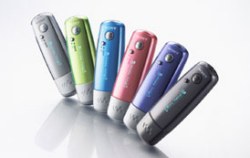 Sony announces in Europe the WALKMAN. No joke, the new Sony music player is just called WALKMAN in capital letters.
Update: On the product page Sony is defining that this is actually the E Series. Not sure why they omitted this in the press-release.
The new USB stick style Flash memory music players feature a single line OLED display. The compact Sony Walkman is 79mm long and weighs only 25g. Sony highlights the fast battery charging time. A charge of 3 minutes gives 3 hours of playback time (only for ATRAC). The WALKMAN plays ATRAC, MP3 and WMA (no DRM - what a pity).
Other features of the WALKMAN include FM-Tuner, 5-Band Equalizer and a nice 28 hour battery-life.
The WALKMAN comes in pink, violet, blue, silver, black and lime green. Available storage configurations will be 512MB to 1GB and 2GB.
The WALKMAN will be available from the end of April 2006 across Europe.
More details on Sony Press release or on I4U.com
Sunday, March 12, 2006
ASUS India introduce new Graphics Card
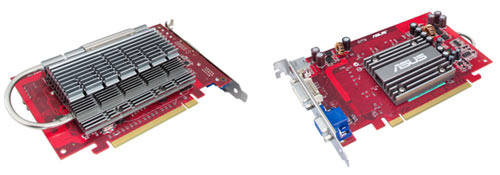
ASUS Extreme AX1300PRO SILENT Graphics Card
ASUSTeK Computer Inc (ASUS), a leading provider of high-quality graphics solutions, today introduced the EAX1300PRO SILENT/TD/256M graphics card. Unlike other models, the chip and the heatsink are placed on the reverse side of the card which facilitates improved airflow and ventilation. The card is not only CrossFire ready, but also features the ASUS patented GPU-on-the-back ReverseCool® Technology, which delivers high-efficiency cooling at absolute quiet 0db. Powered by the powerful ATi RADEON® X1300PRO, and incorporated with various ASUS exclusive features, the EAX1300PRO SILENT/TD/256M provides a superb visual experience.
With the reverse cool technology, the heat sink design is easily visible even after the card is attached in the computer faced down. This is a real gift for the gamers who own chassis with transparent side panels and are eager to display their graphics cards.
The Extreme AX1300PRO SILENT/TD/256M adopts a unique cooling solution that positions the GPU (graphics processing unit) and heatsink on the backside of the graphics card, placing them directly in the airflow path of the CPU fan for fast heat dissipation.
Besides providing larger heat exchange area, the extended heatsink takes on a clamshell design, which enables users to open up the heatsink, like a clamshell phone, for enhanced ventilation. By leveraging the CPU fan, the all-new ASUS graphics card is fan-less and operates at 0dB for quiet computing.
In addition to industry-leading specifications, the graphics card also offers exclusive innovations found only on ASUS solutions.
Sunday, February 26, 2006
What is bird flu?
Bird flu - known technically as avian influenza - is a highly contagious viral disease affecting mostly chickens, ducks, turkeys, quails and other birds, and was first identified more than 100 years ago.
It can be caused by any one of about 20 different strains of the influenza virus. The recent outbreaks in
The virus can infect humans in close contact with birds. There is still no evidence that it can be passed from human to human. The European Union recently approved a series of measures to try to halt the spread of the virus, including the automatic creation of protection and surveillance zones around outbreaks in wild birds.
If the virus transfers from wild birds to poultry, "buffer zones" that could cover an entire region should be established and the transport of poultry restricted within them.
The BBC's Zubair Ahmed in the western Indian city of
Indian health officials have advised people against eating chicken until further notice.
Reference: http://news.bbc.co.uk/1/hi/world/south_asia/4727312.stm
A film of India - Rang De Basanthi
I saw the movie Rang De Basanthi. Liked the movie, and the way it was pictureized.... It shows a different inspiration with some good performances and a short message on patriot feeling for the movie watchers of Indian movie.
Something remarkable is happening in Bollywood. Without any intimation, a blow of wind that brings a change of glory has been blowing silently over minds of Indians. The chances of its reaching gale force and radically altering the status quo are slim, but the difference is already evident. Rang de basanthi gives that evidence.
Amir Khan and his co stars in Rang de basanthi has enough reasons to smile. His performance in Rang De Basanti is receiving critical acclaim. Siddharth who played as a Karan Singhania, the rich kid in the gang, his character is very important to how the story unfolds. Siddharth ends up getting almost equal footage as Amir Khan and the audience sympathy in the climax goes to him. Rang De Basanti has taken a fantastic opening worldwide and inHyderabad
Definitely Rang De Basanthi will be a big hit. I think at the end of the year it will compete for the best film in many categories, with much involvement. really mast movie, energetic one, will remain in mind....thanks for the team for making a good movie.
Something remarkable is happening in Bollywood. Without any intimation, a blow of wind that brings a change of glory has been blowing silently over minds of Indians. The chances of its reaching gale force and radically altering the status quo are slim, but the difference is already evident. Rang de basanthi gives that evidence.
Amir Khan and his co stars in Rang de basanthi has enough reasons to smile. His performance in Rang De Basanti is receiving critical acclaim. Siddharth who played as a Karan Singhania, the rich kid in the gang, his character is very important to how the story unfolds. Siddharth ends up getting almost equal footage as Amir Khan and the audience sympathy in the climax goes to him. Rang De Basanti has taken a fantastic opening worldwide and in
Definitely Rang De Basanthi will be a big hit. I think at the end of the year it will compete for the best film in many categories, with much involvement. really mast movie, energetic one, will remain in mind....thanks for the team for making a good movie.
Sunday, November 27, 2005
How to display Quick Launch Toolbar
It's pretty much a guarantee that the Quick Launch Toolbar appears on your desktop for those running Windows 9.x or 2000. But Microsoft has gone out of its way to hide Internet Explorer from the standard Windows XP desktop, and as a result it has hidden Quick Launch. The toolbar, which also gives you access to the "Show Desktop" and "Windows Media Play" icons, isn't far away, though. You can access it and have it reinstated to your desktop:
- Right-click the taskbar and select Toolbars | Quick Launch.
- You can add items to the Quick launch bar by dragging any icon from the desktop, Start menu, or any Windows Explorer box to the Quick Launch area on the taskbar.
Viewing Documents with Windows XP
Like its predecessors, Windows XP gives you multiple ways to view the documents and files in folders.
- Set your file folder view to Details. Do so by selecting the View drop-down menu and then Details. The default view shows the Name, Size, Type, and Date Modified fields. You can add others.
- Right-click anywhere on the column/fields header (where it says Name, Size, and so on).
- A list will appear with all the field options for the folder view.
- You can add and remove columns by clicking on any of them (those that are set to appear will have a check next to them).
- You can change only one field at a time.
- For more control, click on More... at the bottom of the list.
- A Choose Details dialogue box will appear.
- Select and deselect the fields you want by clicking on the check boxes (or use the Show and Hide buttons on the right side of the box).
- You can even use this dialogue box to change the column viewing order.
- To do so, click on the name of the column and then click the Move Up or Move Down button.
- When you're all finished, click OK.
Friday, October 07, 2005
Indian engineers good only at theory: Microsoft
India does not produce enough computer engineers and those it does are good at theory but not very well equipped to handle the practical aspects, according to Microsoft Corporation's Chief Technical Officer Craig Mundie, who is on a visit to India.
"India produces a lot of engineers. But the production of computer science engineers is low, pro rata.
"Computer engineers are more into theory and less in managing businesses, building businesses or writing source codes, the key to software development," Mundie told Business Standard.
Microsoft has a large number of Indian software engineers on its rolls in India as well as abroad. Out of the 2,000 people working for Microsoft in India, a sizeable proportion comprises software engineers. India produced 401,791 engineers in 2003-04, of which 35 per cent were computer engineers. The number increased to 464,743 in 2004-05, of which 31 per cent were computer engineers.
According to Mundie, the problem with the engineers can be attributed to policy issues. Universities in India, he said, did not get proper funding for research and were not directed towards software development. "The lack of trained staff is addressed by firms through internal arrangements for proper training," he said.
Besides, he said, India did not have enough software companies nor were enough companies developing India-specific applications.
"There are so few Indian software companies developing local software. That is a negative reinforcement, because there is no local software and no new applications," he said.
Wednesday, August 03, 2005
SpyBuddy 3.6
Monitor activity on your PC right down to the keystroke. SpyBuddy records all instant-message activity, disk usage, printed documents, Clipboard contents, and just about everything else.

This application offers a good array of features for monitoring PC activity in your absence. Similar to most software of its kind, SpyBuddy records keystrokes, Web sites visited, and applications used. The program offers you an easy method for configuring settings during launch, and the well-organized and modern interface makes it easy to keep tabs on everything. SpyBuddy can record all disk activities, printed documents, and clipboard contents, and you can regularly get reports via e-mail or FTP. Although you can schedule surveillance sessions in advance, you can't change settings remotely. The utility also can lead users away from temptation by blocking Web sites or applications of your choosing. Finally, like any good surveillance program, SpyBuddy is tough for others to detect and uninstall. If you need to keep children away from adult content or just want peace of mind, SpyBuddy is an easy and virtually foolproof way to wiretap your system.
Download links: http://msn-cnet.com.com/SpyBuddy/3640-2092_4-10422556.html?tag=sptlt_s
This application offers a good array of features for monitoring PC activity in your absence. Similar to most software of its kind, SpyBuddy records keystrokes, Web sites visited, and applications used. The program offers you an easy method for configuring settings during launch, and the well-organized and modern interface makes it easy to keep tabs on everything. SpyBuddy can record all disk activities, printed documents, and clipboard contents, and you can regularly get reports via e-mail or FTP. Although you can schedule surveillance sessions in advance, you can't change settings remotely. The utility also can lead users away from temptation by blocking Web sites or applications of your choosing. Finally, like any good surveillance program, SpyBuddy is tough for others to detect and uninstall. If you need to keep children away from adult content or just want peace of mind, SpyBuddy is an easy and virtually foolproof way to wiretap your system.
| License: | Free to try; $49.99 to buy |
| File size: | 2.26MB |
BitComet 0.57
A new revolution of Downloads on a share and utilise based Torrents.
BitComet is a powerful, clean, fast, and easy-to-use bittorrent client. It is P2P file-sharing freeware fully compatible with Bittorrent, which is one of the most popular P2P protocol designed for high-speed distribution of 100MB or GB sized files. BitComet supports simultaneous downloads, a download queue, selected downloads in torrent package, fast-resume, chatting, disk cache, speed limits, auto-port mapping, proxy, and IP-filter.
Version 0.59 supports DHT Network (Trackerless download).
You can download it from www.bitcomet.com , else from: Downloads.com and its file size is 1.87MB and with a Free License to use.
Thursday, July 28, 2005
Google Video search is Ready
Google has launched its new Web-based video search service, which allows people to use keywords to search the company's indexed database of video from Unicef, Greenpeace, CNET Networks and others that have uploaded content since April.
http://video.google.com/
As previously reported, the search engine complements Google's existing site, which lets people search, but not yet play back, the closed-caption text of television shows from PBS, CNN and others that Google has hosted.
Now the video index includes the new content, which is marked by a triangle icon. Users need to download Google Video Viewer from the site. Once they have, they can watch an entire video piece or start viewing at the section that includes their search keywords.
The content ranges from lighthearted video of break dancing or monkeys doing karate to such historical video as the Saddam Hussein statue being yanked down by American soldiers in Iraq. Google representatives declined to provide a more complete list of content providers.
Wednesday, April 20, 2005
112 Worldwide Emergency Number
112 is called the International Standard Emergency Access Number:
If you are in a place of Emergency and in need of a Help. You can dial 112 from your mobile phone anywhere in the world (where GSM network coverage is available) and get connected to the local emergency number.
112 is the GSM (Global System for Mobile Communications) international standard emergency access number, which can only be dialled on digital mobile phones. It cannot be dialled from a fixed network (land lines) or from other technologies such as CDMA.
Calling to a local emergency number is a FREE call. And 112 can be dialled while the keypad is locked and you don't even need to have a SIM card in your mobile phone to access this service! and can be in any part of the country.
112 GSM International Standard Emergency Access Number is automatically activated, free of charge, when you connect your mobile service.
112 is the International Standard Emergency Access Number, which means this is the number used by all GSM networks world wide. All digital GSM mobile phones are manufactured with this number programmed into them as a default so that when the number is dialled in a coverage area, it will connect the user to the local emergency service number, no matter what country it is in, or whether a SIM card is in the mobile phone.
If you are in a place of Emergency and in need of a Help. You can dial 112 from your mobile phone anywhere in the world (where GSM network coverage is available) and get connected to the local emergency number.
112 is the GSM (Global System for Mobile Communications) international standard emergency access number, which can only be dialled on digital mobile phones. It cannot be dialled from a fixed network (land lines) or from other technologies such as CDMA.
Calling to a local emergency number is a FREE call. And 112 can be dialled while the keypad is locked and you don't even need to have a SIM card in your mobile phone to access this service! and can be in any part of the country.
By dialling 112 you can contact the following emergency services:
Ambulance Services
Police Services
Fire Services.
112 GSM International Standard Emergency Access Number is automatically activated, free of charge, when you connect your mobile service.
112 is the International Standard Emergency Access Number, which means this is the number used by all GSM networks world wide. All digital GSM mobile phones are manufactured with this number programmed into them as a default so that when the number is dialled in a coverage area, it will connect the user to the local emergency service number, no matter what country it is in, or whether a SIM card is in the mobile phone.
Thursday, April 14, 2005
.: Mobile Phones:. Tips & Tricks
.::NOKIA::. TIPS & TRICKS
These Nokia codes will work on most Nokia Mobile Phones.Code Description:
*3370# Activate Enhanced Full Rate Codec (EFR) - Your phone uses the best sound quality but talk time is reduced my approx. 5%
#3370# Deactivate Enhanced Full Rate Codec (EFR)
*4720# Activate Half Rate Codec - Your phone uses a lower quality sound but you should gain approx 30% more Talk Time.
#4720# Deactivate Half Rate Codec.
*#0000# Displays your phones software version, 1st Line : Software Version, 2nd Line : Software Release Date, 3rd Line : Compression Type.
*#9999# Phones software version if *#0000# does not work.
*#06# For checking the International Mobile Equipment Identity (IMEI Number).
#pw+1234567890+1# Provider Lock Status. (use the "*" button to obtain the "p,w" and "+" symbols).
#pw+1234567890+2# Network Lock Status. (use the "*" button to obtain the "p,w" and "+" symbols).
#pw+1234567890+3# Country Lock Status. (use the "*" button to obtain the "p,w" and "+" symbols).
#pw+1234567890+4# SIM Card Lock Status. (use the "*" button to obtain the "p,w" and "+" symbols).
*#147# (vodafone) this lets you know who called you last.
*#1471# Last call (Only vodofone).
*#21# Allows you to check the number that "All Calls" are diverted to.
*#2640# Displays security code in use.
*#30# Lets you see the private number.
*#43# Allows you to check the "Call Waiting" status of your phone.
*#61# Allows you to check the number that "On No Reply" calls are diverted to.
*#62# Allows you to check the number that "Divert If Unreachable (no service)" calls are diverted to.
*#67# Allows you to check the number that "On Busy Calls" are diverted to.
*#67705646# Removes operator logo on 3310 & 3330.
*#73# Reset phone timers and game scores.
*#746025625# Displays the SIM Clock status, if your phone supports this power saving feature "SIM Clock Stop Allowed", it means you will get the best standby time possible.
*#7760# Manufactures code.
*#7780# Restore factory settings.
*#8110# Software version for the nokia 8110.
*#92702689# Displays - 1.Serial Number, 2.Date Made, 3.Purchase Date, 4.Date of last repair (0000 for no repairs), 5.Transfer User Data. To exit this mode you need to switch your phone off then on again.
*#94870345123456789# Deactivate the PWM-Mem.
**21*number# Turn on "All Calls" diverting to the phone number entered.
**61*number# Turn on "No Reply" diverting to the phone number entered.
**67*number# Turn on "On Busy" diverting to the phone number entered.
12345 This is the default security code.press and hold # Lets you switch between lines.
Note: The information written above is gathered from some popular mobile websites, inorder to help the Mobile Phone Users and i'm not reposible for any change in these codes or security reasons of Personal Mobile Phone users.
These Nokia codes will work on most Nokia Mobile Phones.Code Description:
*3370# Activate Enhanced Full Rate Codec (EFR) - Your phone uses the best sound quality but talk time is reduced my approx. 5%
#3370# Deactivate Enhanced Full Rate Codec (EFR)
*4720# Activate Half Rate Codec - Your phone uses a lower quality sound but you should gain approx 30% more Talk Time.
#4720# Deactivate Half Rate Codec.
*#0000# Displays your phones software version, 1st Line : Software Version, 2nd Line : Software Release Date, 3rd Line : Compression Type.
*#9999# Phones software version if *#0000# does not work.
*#06# For checking the International Mobile Equipment Identity (IMEI Number).
#pw+1234567890+1# Provider Lock Status. (use the "*" button to obtain the "p,w" and "+" symbols).
#pw+1234567890+2# Network Lock Status. (use the "*" button to obtain the "p,w" and "+" symbols).
#pw+1234567890+3# Country Lock Status. (use the "*" button to obtain the "p,w" and "+" symbols).
#pw+1234567890+4# SIM Card Lock Status. (use the "*" button to obtain the "p,w" and "+" symbols).
*#147# (vodafone) this lets you know who called you last.
*#1471# Last call (Only vodofone).
*#21# Allows you to check the number that "All Calls" are diverted to.
*#2640# Displays security code in use.
*#30# Lets you see the private number.
*#43# Allows you to check the "Call Waiting" status of your phone.
*#61# Allows you to check the number that "On No Reply" calls are diverted to.
*#62# Allows you to check the number that "Divert If Unreachable (no service)" calls are diverted to.
*#67# Allows you to check the number that "On Busy Calls" are diverted to.
*#67705646# Removes operator logo on 3310 & 3330.
*#73# Reset phone timers and game scores.
*#746025625# Displays the SIM Clock status, if your phone supports this power saving feature "SIM Clock Stop Allowed", it means you will get the best standby time possible.
*#7760# Manufactures code.
*#7780# Restore factory settings.
*#8110# Software version for the nokia 8110.
*#92702689# Displays - 1.Serial Number, 2.Date Made, 3.Purchase Date, 4.Date of last repair (0000 for no repairs), 5.Transfer User Data. To exit this mode you need to switch your phone off then on again.
*#94870345123456789# Deactivate the PWM-Mem.
**21*number# Turn on "All Calls" diverting to the phone number entered.
**61*number# Turn on "No Reply" diverting to the phone number entered.
**67*number# Turn on "On Busy" diverting to the phone number entered.
12345 This is the default security code.press and hold # Lets you switch between lines.
Note: The information written above is gathered from some popular mobile websites, inorder to help the Mobile Phone Users and i'm not reposible for any change in these codes or security reasons of Personal Mobile Phone users.
Important for Mobile phones
To check your Mobile phone's serial number, key in the following digitson your phone:
* # 0 6 #
A 15 digit code will appear on the screen. This number is unique to yourhandset. Write it down and keep it somewhere safe. Should your phone getstolen, you can phone your service provider and give them this code.They will then be able to block your handset so even if the thief changesthe Sim card your phone will be totally useless. You probably won't getyour phone back, but at least you know that whoever stole it can't use/sellit either. If everybody did this, there would be no point in stealingmobile phones.
* # 0 6 #
A 15 digit code will appear on the screen. This number is unique to yourhandset. Write it down and keep it somewhere safe. Should your phone getstolen, you can phone your service provider and give them this code.They will then be able to block your handset so even if the thief changesthe Sim card your phone will be totally useless. You probably won't getyour phone back, but at least you know that whoever stole it can't use/sellit either. If everybody did this, there would be no point in stealingmobile phones.
Tuesday, April 12, 2005
Images
One of the things that I'm interested is in images. There are a lot of things to remember and the thing that seems to be forgotten the most, it is making sure that images have the right extension on them. I mean, you have a GIF (image.gif) file, but you in the HTML, you want try to bring up the same file, but with a JPG extension (image.jpg). This of course will cause the browser to give you a nice little idea about image formats.
All this would be solved if there weren't so many different graphic formats. Ofcourse, each format has a different format, so the solution is to pay closer attention, and also to learn what each format is, and why they are used in different situations.
I will briefly describe 4 basic graphic formats.
The first thing that we need to understand is that there are 2 types of image compression, lossy, and lossless. Different image formats use different compression formats.
Lossless compression compresses an image without removing any data. Lossy compression will discard some of the data so that it can be compressed more. Lossy images typically wouldn't have as many colours available.
1>> JPG, JPEG, or Joint Photographic Experts Group Format images have lossy compression. This is a common format used when saving photographs. Doesn't save line art very well.
2>> GIF, or Graphics Interchange Format uses lossless compression. The image quality might not be that high, but there are sharp edges. This is one of the reasons why it is used on web pages for small graphics. It can retain the sharp edges. Another reason is that GIF images can be used on PCs and Macs.
3>> TIF, TIFF, or Tagged Image File Format is also cross-platform between Macs and PCs. There isn't really any compression with this format and the file size can be quite large.
4>> BMP, or Bitmap Format uses a pixel map which contains line by line information. It is a very common format, as it got its start in Windows. This format can cause an image to be super large.
Just remember when you are working with images to pick the best format most appropriate for what you are doing and for the type of picture it is.
All this would be solved if there weren't so many different graphic formats. Ofcourse, each format has a different format, so the solution is to pay closer attention, and also to learn what each format is, and why they are used in different situations.
I will briefly describe 4 basic graphic formats.
The first thing that we need to understand is that there are 2 types of image compression, lossy, and lossless. Different image formats use different compression formats.
Lossless compression compresses an image without removing any data. Lossy compression will discard some of the data so that it can be compressed more. Lossy images typically wouldn't have as many colours available.
1>> JPG, JPEG, or Joint Photographic Experts Group Format images have lossy compression. This is a common format used when saving photographs. Doesn't save line art very well.
2>> GIF, or Graphics Interchange Format uses lossless compression. The image quality might not be that high, but there are sharp edges. This is one of the reasons why it is used on web pages for small graphics. It can retain the sharp edges. Another reason is that GIF images can be used on PCs and Macs.
3>> TIF, TIFF, or Tagged Image File Format is also cross-platform between Macs and PCs. There isn't really any compression with this format and the file size can be quite large.
4>> BMP, or Bitmap Format uses a pixel map which contains line by line information. It is a very common format, as it got its start in Windows. This format can cause an image to be super large.
Just remember when you are working with images to pick the best format most appropriate for what you are doing and for the type of picture it is.
Subscribe to:
Posts (Atom)


