Recently, we have had a spate of connection leak problems in our JMS operations in production. On analysis we found that a few of our applications are not closing the JMS connections properly. In this entry, I am going to talk about how to close your JMS connections and ways of detecting any connection leaks.
In any JMS operation, you would
a) open a connection to the JMS resource,
b) establish a session and
c) create a producer or a consumer to send or receive messages.
When you create a JMS connection, the container allocates resources on the resource provider. Therefore, the application should be responsible for ensuring that these resources are de-allocated at the end of the operation. From a programming context, this is achieved by calling connection.close().
The application should ensure that the connection.close() is being called irrespective of the outcome of the operation. i.e., it should be called even under exception scenarios. This is typically achieved by closing the connection inside the finally block.
There is generally a confusion about whether closing a connection alone is sufficient or whether the underlying session and the message producer or message consumer should also be closed. The JMS 1.1 spec clearly states that closing a connection alone is sufficient. When a connection.close() is invoked it tells the container that all the constituent objects of that connection should also be closed.
Now, once we have coded everything correctly, we should make sure that we are not leaking connections. How do we identify that? There are a couple of unix commands that I use to make sure that my code is not leaking connections. When we open a connection, a TCP communication channel is opened between your application and the resource provider. In the case of AQ, it is a connection from your JVM to the AQ database. So if we monitor the number of connections that are open between your server and the AQ database, we can find out if there is a leak or not.
One way is to use the netstat command. You can use netstat -an grep 1521 grep dbhost wc -l to get the number of connections opened from your server to the AQ database.
But there is a problem here. We have multiple oc4js running from 1 server. So we will not be able to identify whether the connections are coming from your oc4j or another oc4j. There is another command in unix called lsof which lists all the open files. In unix, a socket is again a file. If you execute the command lsof -i :1521 grep dbhost grep pid wc -l it will give the number of open connections from your oc4j to the AQ database. Here pid is the process id of your oc4j.
Give it a try and let me know your thoughts.
Saturday, January 24, 2009

Wednesday, January 21, 2009
Simple e-Mail Etiquette
- Be concise and to the point
- Answer all questions, and pre-empt further questions
- Use proper spelling, grammar & punctuation
- Use templates for frequently used responses
- Do not attach unnecessary files
- Use proper structure & layout
- Do not overuse the high priority option
- Do not write in CAPITALS
- Don't leave out the message thread
- Read the email twice before you send it
- Use a meaningful subject
- Use Active Voice instead of Passive Voice
- Avoid long sentences.
Sunday, January 18, 2009
To use Notepad as a Log File!!!
1. Open a blank Notepad file
2. Type .LOG (caps) as the first line of the file, followed by a enter. Save the file and close it.
3. Double-click the file to open it and notice that Notepad appends the current date and time to the end of the file and places the cursor on the line after.
4. Type your notes and then save and close the file.
5. Each time you open the file, Notepad repeats the process, appending the time and date to the end of the file and placing the cursor below it!
Source : Read in Chip Magazine of October 2008
2. Type .LOG (caps) as the first line of the file, followed by a enter. Save the file and close it.
3. Double-click the file to open it and notice that Notepad appends the current date and time to the end of the file and places the cursor on the line after.
4. Type your notes and then save and close the file.
5. Each time you open the file, Notepad repeats the process, appending the time and date to the end of the file and placing the cursor below it!
Source : Read in Chip Magazine of October 2008
Thursday, January 15, 2009
Ensure that table statistics are updated before performing a bind
The DB2 optimizer uses the table and index statistics from the DB2 catalogs to determine the optimal access path. If the table statistics do not reflect the data in the table, the optimizer may decide to perform a table scan instead of using indexes.
This can be very expensive depending on the size of the table.
A quick and easy way to look at the statistics is to query the "sysibm.systables" catalog table for the specific table you are interested in and look for the values in columns CARD, NPAGES.
A value of -1 indicates that statistics have not been collected from the table/index and runstats needs to be run on the table.
If the values differ significantly from the number of rows in the table - once again a "runstats" may be necessary to update the catalog statistics.
Once the runstats process has been run, the bind should be performed again so that the optimizer takes advantage of the new statistics.
This can be very expensive depending on the size of the table.
A quick and easy way to look at the statistics is to query the "sysibm.systables" catalog table for the specific table you are interested in and look for the values in columns CARD, NPAGES.
A value of -1 indicates that statistics have not been collected from the table/index and runstats needs to be run on the table.
If the values differ significantly from the number of rows in the table - once again a "runstats" may be necessary to update the catalog statistics.
Once the runstats process has been run, the bind should be performed again so that the optimizer takes advantage of the new statistics.
Monday, January 12, 2009
Change the size of icons in Start menu
We can change the size of icons in Start menu by following these steps:
1. Right click on Taskbar,
2. In new open window click on Start Menu,
3. Choose Customize,
4. In General Click in Large or Small icon,
5. Click on OK,
6. Again click on OK.
Source: Read in a Magazine
1. Right click on Taskbar,
2. In new open window click on Start Menu,
3. Choose Customize,
4. In General Click in Large or Small icon,
5. Click on OK,
6. Again click on OK.
Source: Read in a Magazine
Friday, January 09, 2009
Sending broadcast packets in Java
Broadcasting is defined as sending a packet to all network nodes on a subnet. An IP network subnet mask divides an IP address into two parts: the network identifier and the node identifier. A broadcast address is defined as an IP address where all bits of the node identifier are set.
So, sending a broadcast packet from a Java program (or from a program in any other language, for that matter) simply requires you to specify the broadcast address as the destination for the packet.
Source: java-tips.org
So, sending a broadcast packet from a Java program (or from a program in any other language, for that matter) simply requires you to specify the broadcast address as the destination for the packet.
Source: java-tips.org
Tuesday, January 06, 2009
Disabling My Computer
Disabling My ComputerIn areas where you are trying to restrict what users can do on the computer, it might be beneficial to disable the ability to click on My Computer and have access to the drives, control panel etc.
To disable this:
1.Open RegEdit
2.Search for 20D04FE0-3AEA-1069-A2D8-08002B30309D
3.This should bring you to the HKEY_CLASSES_ROOT\CLSID section
4.Delete the entire section.
Now when you click on My Computer, nothing will happen.
You might want to export this section to a Registry file before deleting it just in case you want to enable it again. Or you can rename it to 20D0HideMyComputer4FE0-3AEA-1069-A2D8-08002B30309D. You can also hide all the Desktop Icons, see Change/Add restrictions.
To disable this:
1.Open RegEdit
2.Search for 20D04FE0-3AEA-1069-A2D8-08002B30309D
3.This should bring you to the HKEY_CLASSES_ROOT\CLSID section
4.Delete the entire section.
Now when you click on My Computer, nothing will happen.
You might want to export this section to a Registry file before deleting it just in case you want to enable it again. Or you can rename it to 20D0HideMyComputer4FE0-3AEA-1069-A2D8-08002B30309D. You can also hide all the Desktop Icons, see Change/Add restrictions.
Saturday, January 03, 2009
How to Change User Password at Command Prompt
How to use the net user command to change the user password at a Windows command prompt. Only administrators can change domain passwords at the Windows command prompt. To change a user's password at the command prompt, log on as an administrator and type:
"net user * /domain" (without the quotation marks)
When you are prompted to type a password for the user, type the new password, not the existing password. After you type the new password, the system prompts you to retype the password to confirm. The password is now changed.
Alternatively, you can type the following command: net user . When you do so, the password changes without prompting you again. This command also enables you to change passwords in a batch file.
Non-administrators receive a "System error 5 has occurred. Access is denied" error message when they attempt to change the password.
"net user * /domain" (without the quotation marks)
When you are prompted to type a password for the user, type the new password, not the existing password. After you type the new password, the system prompts you to retype the password to confirm. The password is now changed.
Alternatively, you can type the following command: net user . When you do so, the password changes without prompting you again. This command also enables you to change passwords in a batch file.
Non-administrators receive a "System error 5 has occurred. Access is denied" error message when they attempt to change the password.
Wednesday, December 31, 2008
Debugging ColdFusion
ColdFusion provides detailed debugging information to help you resolve problems with your application. Debugging can be done in two ways:
1.By specifying the DEBUG attribute in tag.
2.By enabling server side debugging in ColdFusion Administrator panel.
For instance,
SELECT Distributor.Distributor_ID,
Distributor.Distributor_Name FROM Distributor ORDER BY Distributor.Distributor_ID Returns, q_GetDist (Records=9, Time=421ms) SQL= SELECT Distributor.Distributor_ID, Distributor.Distributor_Name FROM Distributor ORDER BY Distributor.Distributor_ID
1.By specifying the DEBUG attribute in
2.By enabling server side debugging in ColdFusion Administrator panel.
For instance,
SELECT Distributor.Distributor_ID,
Distributor.Distributor_Name FROM Distributor ORDER BY Distributor.Distributor_ID
Tuesday, December 30, 2008
Hide Quick Navigation Bar
Customization of SharePoint pages, that is hiding the quick navigation, recycle bin, view all the site content from the left navigation. Here is a real quick way to achieve it.
Copy the above code lines and add a content editor webpart to any of the webpart Zone and past the copied above lines, you also make visible false of the webpart.
Copy the above code lines and add a content editor webpart to any of the webpart Zone and past the copied above lines, you also make visible false of the webpart.
Monday, December 29, 2008
C# Brainteasers
Here's some code using the anonymous method feature of C# .
What does it do?
using System;
using System.Collections.Generic;
class Test{
delegate void Printer();
static void Main() {
List printers = new List();
for (int i=0; i <>
{
printers.Add(delegate { Console.WriteLine(i); } );
}
foreach (Printer printer in printers)
{
printer();
}
}
}
What does it do?
using System;
using System.Collections.Generic;
class Test{
delegate void Printer();
static void Main() {
List
for (int i=0; i <>
{
printers.Add(delegate { Console.WriteLine(i); } );
}
foreach (Printer printer in printers)
{
printer();
}
}
}
Saturday, December 27, 2008
Cellphone Hazards
Fact: Malignant brain tumors are the second leading cause of death in children and young adults in the United States, and this epidemic is largely caused by radiation from a cellphones which penetrate the heads of users. If you always use your cellphones for calls and has experienced ear pain, headaches, dizziness, insomnia, irritability, stress, memory loss, high blood pressure and ringing in the ears, you better start limiting yourself from using that mobile phone, or at least pave way to a number of safety options.Studies show that there is a correlation between cell phone emissions and a slightly higher incidence of human brain tumors, cell growth in human blood micronuclei, and DNA breakages. Other studies show that electromagnetic signals from cellular phones reduce the ability to concentrate, calculate and coordinate complicated activities such as driving a car. Using a cell phone is also responsible for impairing of memory and reaction times. Even the so called hands-free mobile speaker-phones do more as they emit 10-times more brainwave interference than handheld units. Sixty percent of the radiation emitted by a typical cell phone is absorbed by the user’s head, and the radiation that is coming out from the ear piece is four times out of the antenna, and a similar amount of radiation comes from the keypad and mouthpiece as well. It should be noted also that different brands and models of cellphones have widely different levels of emissions.
Four times the radiation is leaked into the side of the head than is actually being used to transmit a signal. Highest emission comes from the antenna region. The reason for the leakage is that manufacturers tend to lower down the production cost, in exchange of lessening down the radiation that would escape into the user’s head and lowering down possible risks, thus the source of leakage: poorly matched transmitters, feeds and antennas. It must also be blamed to the lack of shielding in the phone case.
It is important that mobile phone manufacturers should be alarmed with this scenario and start designing cell phones that will not endanger the health of users. Make sure that all cellphones are sold with head sets or earphones. In this way, the user will have the option of not using the cellphone close to his head. The truth is, the essential key to safety lies to the manufacturers themselves, by designing safety features that will help protect and reassure their customers.
This information is from Sciencetips.com
Four times the radiation is leaked into the side of the head than is actually being used to transmit a signal. Highest emission comes from the antenna region. The reason for the leakage is that manufacturers tend to lower down the production cost, in exchange of lessening down the radiation that would escape into the user’s head and lowering down possible risks, thus the source of leakage: poorly matched transmitters, feeds and antennas. It must also be blamed to the lack of shielding in the phone case.
It is important that mobile phone manufacturers should be alarmed with this scenario and start designing cell phones that will not endanger the health of users. Make sure that all cellphones are sold with head sets or earphones. In this way, the user will have the option of not using the cellphone close to his head. The truth is, the essential key to safety lies to the manufacturers themselves, by designing safety features that will help protect and reassure their customers.
This information is from Sciencetips.com
Tuesday, December 23, 2008
Resolving the newfolder.exe virus
Two days back my PC got affected by this virus very badly as it eat up all my empty hard disk space of around 700 MB.
This virus is know popularly as regsvr.exe virus, or as new folder.exe virus and most people identify this one by seeing autorun.inf file on their pen drives. It is spreading mostly using pen drives as the medium.
So I will tell you that how to remove this virus manually.
I prefer manual process simply because it gives me option to learn new things in the process.
Source for this post:
http://amiworks.co.in/talk/how-to-remove-new-folderexe-or-regsvrexr-or-autoruninf-virus/
This virus is know popularly as regsvr.exe virus, or as new folder.exe virus and most people identify this one by seeing autorun.inf file on their pen drives. It is spreading mostly using pen drives as the medium.
So I will tell you that how to remove this virus manually.
I prefer manual process simply because it gives me option to learn new things in the process.
- Search for autorun.inf file. It is a read only file so you will have to change it to normal by right clicking the file , selecting the properties and un-check the read only option.
- Open the file in notepad and delete everything and save the file.
- Now change the file status back to read only mode so that the virus could not get access again.
- Click start->run and type msconfig and click ok
- Go to startup tab look for regsvr and uncheck the option click OK.
- Click on Exit without Restart.
- Now go to control panel -> scheduled tasks, and delete the At1 task.
- Click on start -> run and type gpedit.msc and click Ok.
- Go to users configuration->Administrative templates->system Find “prevent access to registry editing tools” and change the option to disable.
- Once you do this you have registry access back.
- Click on start->run and type regedit and click ok
- Go to edit->find and start the search for regsvr.exe,
- Delete all the occurrence of regsvr.exe; remember to take a backup before deleting.
- Don't delete the regsvr32.exe.
- Delete regsvr.exe occurrences only.
- At one or two places you will find it after explorer.exe in theses cases only delete the regsvr.exe part and not the whole part. E.g. Shell = “Explorer.exe regsvr.exe” the just delete the regsvr.exe and leave the explorer.exe
- Click on start->search->for files and folders. Their click all files and folders Type “*.exe” as filename to search for
- Click on ‘when was it modified ‘ option and select the specify date option Type from date as 10/16/2008 and also type To date as 10/16/2008
- Now hit search and wait for all the exe’s to show up.
- Once search is over select all the exe files and shift+delete the files, caution must be taken so that you don’t delete the legitimate exe file.
- Also find and delete regsvr.exe, svchost .exe
Source for this post:
http://amiworks.co.in/talk/how-to-remove-new-folderexe-or-regsvrexr-or-autoruninf-virus/
Saturday, December 20, 2008
Search a User By name & get his ID on Unix
#! /usr/bin/sh
echo "Enter User Name to be Searched"
read USERNAME
NAMES=`who awk {'print $1'} sort -u`
for NAME in $NAMES
do
USER=`finger $NAMEgrep $USERNAME awk {'print $7,$8'}`
if [ "$USER" != "" ]
then
echo $USER ——- $NAME
fi
done
echo "Enter User Name to be Searched"
read USERNAME
NAMES=`who awk {'print $1'} sort -u`
for NAME in $NAMES
do
USER=`finger $NAMEgrep $USERNAME awk {'print $7,$8'}`
if [ "$USER" != "" ]
then
echo $USER ——- $NAME
fi
done
Wednesday, December 17, 2008
Searching lines before & After in Unix
#! /usr/bin/sh
#———————————————–
#Program used to search a seed in a program
#———————————————–
SEED=$1
LINE=$2
FILE1=$3
for X in `awk '/'"$SEED"'/{ print NR }' $FILE1 `
do
echo ———————– $SEED ————————————–
NOB=`expr $X - $LINE`
NOA=`expr $X + $LINE`
if [ $NOB -lt 1 ]; then NOB=1
fi
for J in `awk 'NR == '"$NOB"',NR == '"$NOA"'
{
if(NF!=0) print; else print "\n"
}' $FILE1 `
do
echo $J
done
echo ——————————————————————-
done
#———————————————–
#Program used to search a seed in a program
#———————————————–
SEED=$1
LINE=$2
FILE1=$3
for X in `awk '/'"$SEED"'/{ print NR }' $FILE1 `
do
echo ———————– $SEED ————————————–
NOB=`expr $X - $LINE`
NOA=`expr $X + $LINE`
if [ $NOB -lt 1 ]; then NOB=1
fi
for J in `awk 'NR == '"$NOB"',NR == '"$NOA"'
{
if(NF!=0) print; else print "\n"
}' $FILE1 `
do
echo $J
done
echo ——————————————————————-
done
Monday, December 15, 2008
Deploying J2EE applications on JBOSS Application Server
Step 1: Go /server//log
Step2 : Bring down the JBOSS Application server, Copy J2EE files like WAR/JAR/EAR/SAR/ZIP/RAR/JSE or xxx-ds.xml (data source) under the deploy directory
Step3:
Bring up the JBOSS Application service after deployment, follow the steps in 6.1.2
Go to/server//log
Open console.log and check whether J2EE files are deployed successfully
Note: Application stop/start is not required if it is a Hot deployment.
Step2 : Bring down the JBOSS Application server, Copy J2EE files like WAR/JAR/EAR/SAR/ZIP/RAR/JSE or xxx-ds.xml (data source) under the deploy directory
Step3:
Bring up the JBOSS Application service after deployment, follow the steps in 6.1.2
Go to
Open console.log and check whether J2EE files are deployed successfully
Note: Application stop/start is not required if it is a Hot deployment.
Saturday, December 13, 2008
ROUND() function in sql
Syntax:
ROUND ( numeric_expression , length [ ,function ] )
numeric_expression Is an expression of the exact numeric or approximate numeric data type category, except for the bit data type.
length Is the precision to which numeric_expression is to be rounded. length must be an expression of type tinyint, smallint, or int. When length is a positive number, numeric_expression is rounded to the number of decimal positions specified by length. When length is a negative number, numeric_expression is rounded on the left side of the decimal point, as specified by length.
function Is the type of operation to perform. function must be tinyint, smallint, or int. When function is omitted or has a value of 0 (default), numeric_expression is rounded. When a value other than 0 is specified, numeric_expression is truncated.
SELECT ROUND(column_name,decimals) FROM table_name
Parameter Description column_name Required. The field to round. decimals Required. Specifies the number of decimals to be returned.
1. SELECT ROUND(10.09 ,1) = 10.1
2. SELECT ROUND(10.09 ,-1) = 10
ROUND ( numeric_expression , length [ ,function ] )
numeric_expression Is an expression of the exact numeric or approximate numeric data type category, except for the bit data type.
length Is the precision to which numeric_expression is to be rounded. length must be an expression of type tinyint, smallint, or int. When length is a positive number, numeric_expression is rounded to the number of decimal positions specified by length. When length is a negative number, numeric_expression is rounded on the left side of the decimal point, as specified by length.
function Is the type of operation to perform. function must be tinyint, smallint, or int. When function is omitted or has a value of 0 (default), numeric_expression is rounded. When a value other than 0 is specified, numeric_expression is truncated.
SELECT ROUND(column_name,decimals) FROM table_name
Parameter Description column_name Required. The field to round. decimals Required. Specifies the number of decimals to be returned.
1. SELECT ROUND(10.09 ,1) = 10.1
2. SELECT ROUND(10.09 ,-1) = 10
Thursday, December 11, 2008
Want to make money with the iPhone SDK ?
There are success stories of people making close to $ 250,000 by writing apps for iPhone. Recently, Apple dropped an NDA that prevented developers from sharing their knowledge on the iPhone with others. A flood of tutorials and reviews on the iPhone SDK opened up.
Here is one tutorial on writing an iPhone app:
http://www.cimgf.com/2008/10/01/cocoa-touch-tutorial-iphone-application-example/
So,if you want to start a ‘small scale IT business’ .This is one way now
Here is one tutorial on writing an iPhone app:
http://www.cimgf.com/2008/10/01/cocoa-touch-tutorial-iphone-application-example/
So,if you want to start a ‘small scale IT business’ .This is one way now
Tuesday, December 09, 2008
SQL: Joins
The SQL JOIN clause is used whenever we have to select data from 2 or more tables. To be able to use SQL JOIN clause to extract data from 2 (or more) tables, we need a relationship between certain columns in these tables.
Inner Join (simple join)Chances are, you've already written an SQL statement that uses an inner join. It is the most common type of join. Inner joins return all rows from multiple tables where the join condition is met.
Outer JoinAnother type of join is called an outer join. This type of join returns all rows from one table and only those rows from a secondary table where the joined fields are equal (join condition is met).
Inner Join (simple join)Chances are, you've already written an SQL statement that uses an inner join. It is the most common type of join. Inner joins return all rows from multiple tables where the join condition is met.
Outer JoinAnother type of join is called an outer join. This type of join returns all rows from one table and only those rows from a secondary table where the joined fields are equal (join condition is met).
Sunday, December 07, 2008
Undraggable alert
Yesday i was seeing an undraggable alert in flex ..its quite simple just set the property "isPopUp" to "flase" to not dgraggable and "true" for drggable.
Here is a code..you can try it
Script:
private function showAlert():void
{
title ="Undraggable Alert";
myAlert = Alert.show("HI Cognizant!!",title);
myAlert.isPopUp = false;
myAlert.status = Capabilities.version;
}
Here is a code..you can try it
Script:
private function showAlert():void
{
title ="Undraggable Alert";
myAlert = Alert.show("HI Cognizant!!",title);
myAlert.isPopUp = false;
myAlert.status = Capabilities.version;
}
Friday, December 05, 2008
Difference Between URL and URI
The first difference, which is a hint for the different meaning,is what it stands for:
URI - Uniform Resource Identifier
URL - Uniform Resource Locator
A URI _identifies_ a resource by meta-information of any kind.
A URL _locates_ a resource on the net, which means if you havea URL and the appropriate protocol you can retrieve the resource.
There are many different URI, e.g.:-
URL - Uniform Resource Locator
URC - Uniform Resource Characteristics
URN - Uniform Resource Names
One characteristic of a URI is, that it gives information aboutexactly one resource. Another is there can be more than one URIdescribing the same resource.
That was the theory, here is an example:
URI: <http://www.w3.org/>
URI: <http://www.w3.org/>
URL: http://www.w3.org/pub/WWW/>
All lines describing the same resource (the URL describes the location).
URI - Uniform Resource Identifier
URL - Uniform Resource Locator
A URI _identifies_ a resource by meta-information of any kind.
A URL _locates_ a resource on the net, which means if you havea URL and the appropriate protocol you can retrieve the resource.
There are many different URI, e.g.:-
URL - Uniform Resource Locator
URC - Uniform Resource Characteristics
URN - Uniform Resource Names
One characteristic of a URI is, that it gives information aboutexactly one resource. Another is there can be more than one URIdescribing the same resource.
That was the theory, here is an example:
URI: <http://www.w3.org/>
URI: <http://www.w3.org/>
URL: http://www.w3.org/pub/WWW/>
All lines describing the same resource (the URL describes the location).
Wednesday, December 03, 2008
Levels in (service) Quality!
No..I am not talking about CMMI Levels. Recently came across these in a book by Ron Kaufman
Level 1 - Criminal
Level 2 - Basic
Level 3 - Expected
Level 4 - Desired
Level 5 - Surprising
Level 6- Unbelievable!
(Think about it as how your client perceives the quality you deliver..the products you deliver..the services you deliver)
Level 1 - Criminal
Level 2 - Basic
Level 3 - Expected
Level 4 - Desired
Level 5 - Surprising
Level 6- Unbelievable!
(Think about it as how your client perceives the quality you deliver..the products you deliver..the services you deliver)
Monday, December 01, 2008
New iPod Touch faster than iPhone 3G
The second-generation iPod Touch uses a slightly faster processor than the iPhone 3G.
Apple appears to have upped the processing speed of the iPod Touch in order to help it go after the portable-game market.
Touch Arcade reports that the applications processor inside the second-generation iPod Touch unveiled in September is actually running faster than the processor inside the iPhone 3G, which runs at the same speed that the original iPhone and iPod Touch used. The new iPod Touch's ARM-based processor is running at 532MHz, while the iPhone 3G's processor runs at 412MHz.
A game developer interviewed by Touch Arcade noticed a huge difference in 3D-rendering speed as a result of the speed bump. As we remember fondly from our "megahertz madness" days of the Intel-AMD competition in the PC, processor speed is not the only measure of performance, but it is an important one.
With the arrival of the App Store, Apple has been marketing the latest iPod Touch as a gaming device in its latest round of commercials, almost completely ignoring the fact that it's a music and video player as well.
It seems that Apple has room to boost the clock speed of the processor to 620MHz, according to ARM's specifications, but that requires striking a balance between performance and battery life.
Apple appears to have upped the processing speed of the iPod Touch in order to help it go after the portable-game market.
Touch Arcade reports that the applications processor inside the second-generation iPod Touch unveiled in September is actually running faster than the processor inside the iPhone 3G, which runs at the same speed that the original iPhone and iPod Touch used. The new iPod Touch's ARM-based processor is running at 532MHz, while the iPhone 3G's processor runs at 412MHz.
A game developer interviewed by Touch Arcade noticed a huge difference in 3D-rendering speed as a result of the speed bump. As we remember fondly from our "megahertz madness" days of the Intel-AMD competition in the PC, processor speed is not the only measure of performance, but it is an important one.
With the arrival of the App Store, Apple has been marketing the latest iPod Touch as a gaming device in its latest round of commercials, almost completely ignoring the fact that it's a music and video player as well.
It seems that Apple has room to boost the clock speed of the processor to 620MHz, according to ARM's specifications, but that requires striking a balance between performance and battery life.
Saturday, November 29, 2008
select keyword in rexxx
SELECT keyword in REXX is like switch case keyword used in c. This keyword allows to select one of the conditional expressions.
syntax :
select
when cond1 then …
when cond2 then …
otherwise …
end
example :
/*rexx*/
number = 100
select
when number < 5 then say "less than 5" /*condition not sastisfied.this statement will not get executed*/
when number < 50 then say "less than 50" /*condition not sastisfied.this statement will not get executed*/
otherwise say "it should be greater than 50" /*condition sastisfied.this statement will get executed*/
end
syntax :
select
when cond1 then …
when cond2 then …
otherwise …
end
example :
/*rexx*/
number = 100
select
when number < 5 then say "less than 5" /*condition not sastisfied.this statement will not get executed*/
when number < 50 then say "less than 50" /*condition not sastisfied.this statement will not get executed*/
otherwise say "it should be greater than 50" /*condition sastisfied.this statement will get executed*/
end
Thursday, November 27, 2008
How to write a file in rexx
/*REXX*/
FILE = "N4C4F1.C3162.AUG13"
INPUT ="SAMPLE PROGRAM"
INPUT1 = "HOW TO WRITE a FILE"
INPUT2 = " THROUGH REXX"
DROP Z.
Z.1 = INPUT
Z.2 = INPUT1INPUT2
"ALLOC FI(OPDD) DA('"FILE"') SHR REUSE"
"EXECIO * DISKW OPDD (FINIS STEM Z."
FILE = "N4C4F1.C3162.AUG13"
INPUT ="SAMPLE PROGRAM"
INPUT1 = "HOW TO WRITE a FILE"
INPUT2 = " THROUGH REXX"
DROP Z.
Z.1 = INPUT
Z.2 = INPUT1INPUT2
"ALLOC FI(OPDD) DA('"FILE"') SHR REUSE"
"EXECIO * DISKW OPDD (FINIS STEM Z."
Tuesday, November 25, 2008
Pen Drive -a part of Life
Technology has always been a necessary evil.However, like many other equipments, pen drives are also a necessary evil and pose a potential security threat to the technology world. When placed in wrong hands, the portability and high storage capacity of the pen drive can be hazardous. The device has evolved as a threat to the corporate and other organizations where security of data is given utmost importance.
The threats that are associated with pen drives are serious. Some of them are listed below.
Pen drives barely allow any security system in terms of password or any other built in security feature. So it is more likely that if a person loses a pen drive, the data inside it can be accessed by anyone. If it falls in wrong hands he or she can misuse it. a pen drive can be easily stolen or misplaced and the data stored inside it can be easily manipulated. There have large demand for pen drives with some security systems such as finger-print reader or protective software.
There has been a conscious protest against pen drives in many private and government organization. Though it is a convenient device for the productive brains, it has proved to be beneficial for the thieves as well. Pen drives are small in size and have greater capacity to store information. Hence the thieves can carry the device stealthily in pockets and take information.
The threats that are associated with pen drives are serious. Some of them are listed below.
- Stealing of data
- Spreading virus
- Plant malicious software
- Causing data loss
Pen drives barely allow any security system in terms of password or any other built in security feature. So it is more likely that if a person loses a pen drive, the data inside it can be accessed by anyone. If it falls in wrong hands he or she can misuse it. a pen drive can be easily stolen or misplaced and the data stored inside it can be easily manipulated. There have large demand for pen drives with some security systems such as finger-print reader or protective software.
There has been a conscious protest against pen drives in many private and government organization. Though it is a convenient device for the productive brains, it has proved to be beneficial for the thieves as well. Pen drives are small in size and have greater capacity to store information. Hence the thieves can carry the device stealthily in pockets and take information.
Monday, November 24, 2008
Fetching a row from table(ispf) using rexx
This is a simple rexx code, to fetch a row from ispf table.
lets say the table name is "sample" & it has two columns "id" & "name"
id name
001 agent001
002 agent002
003 agent003
if u want to know the name of person with id = '001' . then this is a simple code.
/*REXX*/
TDSN = "aaa.dsn"
ID = '001'
ADDRESS ISPEXEC "CONTROL ERRORS RETURN"
ADDRESS ISPEXEC "LIBDEF ISPTLIB"
ADDRESS ISPEXEC "LIBDEF ISPTABL"
ADDRESS ISPEXEC "LIBDEF ISPTLIB DATASET ID ('"TDSN"') UNCOND"
ADDRESS ISPEXEC "LIBDEF ISPTABL DATASET ID ('"TDSN"') UNCOND"TNAME = "SAMPLE"
ADDRESS ISPEXEC "TBCLOSE "TNAME
ADDRESS ISPEXEC "TBOPEN "TNAME
ADDRESS ISPEXEC "TBTOP "TNAME
ADDRESS ISPEXEC "TBSCAN "TNAME" ARGLIST ( ID )"
ADDRESS ISPEXEC "TBGET " TNAME
VARNAME = NAME
ADDRESS ISPEXEC "TBCLOSE "TNAME
ADDRESS ISPEXEC "LIBDEF ISPTLIB"
ADDRESS ISPEXEC "LIBDEF ISPTABL" SAY VARNAME
result : agent001
lets say the table name is "sample" & it has two columns "id" & "name"
id name
001 agent001
002 agent002
003 agent003
if u want to know the name of person with id = '001' . then this is a simple code.
/*REXX*/
TDSN = "aaa.dsn"
ID = '001'
ADDRESS ISPEXEC "CONTROL ERRORS RETURN"
ADDRESS ISPEXEC "LIBDEF ISPTLIB"
ADDRESS ISPEXEC "LIBDEF ISPTABL"
ADDRESS ISPEXEC "LIBDEF ISPTLIB DATASET ID ('"TDSN"') UNCOND"
ADDRESS ISPEXEC "LIBDEF ISPTABL DATASET ID ('"TDSN"') UNCOND"TNAME = "SAMPLE"
ADDRESS ISPEXEC "TBCLOSE "TNAME
ADDRESS ISPEXEC "TBOPEN "TNAME
ADDRESS ISPEXEC "TBTOP "TNAME
ADDRESS ISPEXEC "TBSCAN "TNAME" ARGLIST ( ID )"
ADDRESS ISPEXEC "TBGET " TNAME
VARNAME = NAME
ADDRESS ISPEXEC "TBCLOSE "TNAME
ADDRESS ISPEXEC "LIBDEF ISPTLIB"
ADDRESS ISPEXEC "LIBDEF ISPTABL" SAY VARNAME
result : agent001
Saturday, November 22, 2008
JBoss is loosing its charm ?
Jboss is certainly facing an evolution competitive front, and basically has not reponded to it.
The competitive fronts are two-fold, and will be recognizable by even the most passing of observers in the middleware market.
1. Seam is losing month-by-month to Spring
2. Jboss is losing month-by-month to Glassfish
Here are some of the proof-points, first the JCP page for Web Beans, the standardization process of Seam:
http://jcp.org/en/jsr/detail?id=299
It shows a slower growth, while Spring rolls out S2AP and myriad other complementary technologies to seize the develper's attention. Seam is dying on the vine, and its own complexity does not bode well for a major roll-out of improvements any time soon
Just look at jboss.org, it is a mind -numbing array of ongoing and outstanding projects with SSO, ESB, and Rules among others seemingly having no delivery date in sight, that translates to project stability. This makes us to think whether JBoss products and projects is under-resourced?
The competitive fronts are two-fold, and will be recognizable by even the most passing of observers in the middleware market.
1. Seam is losing month-by-month to Spring
2. Jboss is losing month-by-month to Glassfish
Here are some of the proof-points, first the JCP page for Web Beans, the standardization process of Seam:
http://jcp.org/en/jsr/detail?id=299
It shows a slower growth, while Spring rolls out S2AP and myriad other complementary technologies to seize the develper's attention. Seam is dying on the vine, and its own complexity does not bode well for a major roll-out of improvements any time soon
Just look at jboss.org, it is a mind -numbing array of ongoing and outstanding projects with SSO, ESB, and Rules among others seemingly having no delivery date in sight, that translates to project stability. This makes us to think whether JBoss products and projects is under-resourced?
Thursday, November 20, 2008
AMD seeks redemption with ‘Shanghai’ chip
Let bygones be bygones. That's what Advanced Micro Devices is hoping for with the roll-out of its first 45-nanometer processor Thursday. The No. 2 PC processor supplier will make the case that Shanghai is not Barcelona. The latter chip–AMD's first quad-core processor–was rolled out in September 2007 to great fanfare but then faced prolonged delays. This gave Intel an opportunity to regain ground it had lost to AMD in the server chip market. Shanghai is not a new architecture but essentially a refresh of AMD's Barcelona Opteron chip. AMD claims Shanghai is 35 percent faster than Barcelona. The chip is being built on 45-nanometer process technology, while Barcelona was a 65-nanometer part. Typically, the smaller the geometries, the faster and more power efficient the processor
More >> http://news.cnet.com/8301-13924_3-10095649-64.html?tag=newsEditorsPicksArea.0
More >> http://news.cnet.com/8301-13924_3-10095649-64.html?tag=newsEditorsPicksArea.0
Wednesday, November 19, 2008
Excel - Tip -2
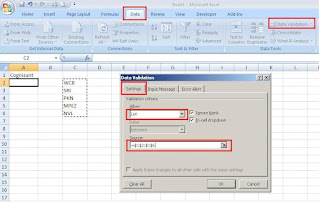
Excel enables us to restrict the values a user can enter in a cell. by restricting the values, we can ensure that our workbook entries are valid and also the calculations based on them are valid.
Follow these simple steps:
To create a validation list, we first need to type the values we want to include in the adjacent cells in a column or a row.
1. Click on the cell, in which we want to create a validation list.
2. Click on "Data" tab
3. Click on "Data Validation" option.
4. In the "Data Validation" dialog box, select "Settings" tab
5. Select the "List" option from the "Allow" drop down list.
6. Click in the "Source" field and Click & drag the validation entries (the one we have entered in the excel file)
7. Click on "Ok" button.
Now, the Excel will create the validation list, in the cell we have selected it.
Follow these simple steps:
To create a validation list, we first need to type the values we want to include in the adjacent cells in a column or a row.
1. Click on the cell, in which we want to create a validation list.
2. Click on "Data" tab
3. Click on "Data Validation" option.
4. In the "Data Validation" dialog box, select "Settings" tab
5. Select the "List" option from the "Allow" drop down list.
6. Click in the "Source" field and Click & drag the validation entries (the one we have entered in the excel file)
7. Click on "Ok" button.
Now, the Excel will create the validation list, in the cell we have selected it.
Saturday, November 15, 2008
Excel tip -1
Hide Rows by Grouping
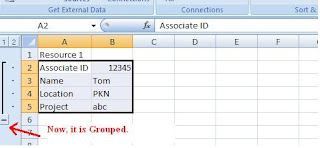
Using the Grouping option present in the Excel, we can hide the set of rows / columns.
Follow these steps,
1. Select the rows / columns that we need to hide.
2. Click on "Data" tab
3. Click on "Group" option
4. In the Group dialog box, select Rows/Columns option.
5. Click on OK button
Now, the Excel will create a clickable button on the far left or top of the worksheet. The button displayed either minus or a plus sign, depending on what is displayed in the worksheet
Using the Grouping option present in the Excel, we can hide the set of rows / columns.
Follow these steps,
1. Select the rows / columns that we need to hide.
2. Click on "Data" tab
3. Click on "Group" option
4. In the Group dialog box, select Rows/Columns option.
5. Click on OK button
Now, the Excel will create a clickable button on the far left or top of the worksheet. The button displayed either minus or a plus sign, depending on what is displayed in the worksheet

Wednesday, November 12, 2008
A wonderful tool in Excel!
Having used Microsoft Excel for presenting reports in the client's side, I wanted to share how wonderful a tool this is. Arguably, it is a tool used at some level by most people in an IT organization. Be it creating simple reports, business presentations using its versatile charts or even creating some simple birthday party accounts, Excel is a very important tool in MS Office suite of applications.
While Excel's worksheet formulas are being used extensively, its VBA properties, if harnessed properly, are much more rewarding. Hence, a little bit about learning VBA for somebody who will be interested -
For a set of tasks to be performed, select Tools –> Macros –> Record Macro (Office 2003) or Developer –> Record Macro (Office 2007) and then start doing what you want to do. Stop the recording and then open the Macro editor (Alt + F11). You will find the code recorded for the steps you had went through. This will be a very good starting place to explore and leverage this wonderful tool. Using the VBA help next will help fine tune the skill…
While Excel's worksheet formulas are being used extensively, its VBA properties, if harnessed properly, are much more rewarding. Hence, a little bit about learning VBA for somebody who will be interested -
For a set of tasks to be performed, select Tools –> Macros –> Record Macro (Office 2003) or Developer –> Record Macro (Office 2007) and then start doing what you want to do. Stop the recording and then open the Macro editor (Alt + F11). You will find the code recorded for the steps you had went through. This will be a very good starting place to explore and leverage this wonderful tool. Using the VBA help next will help fine tune the skill…
Sunday, November 09, 2008
Make a Step to SWITCH OFF…
Nowadays, we face lot of power cuts. We are worried about power cuts. All the weekdays we keep our self cool in Office. As soon as we reach home, our hands are in search of our Fan/Ac Switch…
The Next minute the power is off, we get irritated. We curse the EB Dept, Govt. and many others…. Do we ever care for switching off electrical items, after the use.
Have you ever noticed the street Lamps Glowing after 6.00 Am?
If yes, have you made an attempt to switch it off? Or
At least to make a complaint on this, to the Municipality?
Our duty not only ends in casting a vote to a person.
Whenever there is a problem. At the Max we do is getting frustrated, curse the people and walk off.
It’s every individual’s duty to take the responsibility for things happening around him/her.I don’t say that we should jump in streets and fight for the power cuts?
At Least make a step to put the Switches off…
The Next minute the power is off, we get irritated. We curse the EB Dept, Govt. and many others…. Do we ever care for switching off electrical items, after the use.
Have you ever noticed the street Lamps Glowing after 6.00 Am?
If yes, have you made an attempt to switch it off? Or
At least to make a complaint on this, to the Municipality?
Our duty not only ends in casting a vote to a person.
Whenever there is a problem. At the Max we do is getting frustrated, curse the people and walk off.
It’s every individual’s duty to take the responsibility for things happening around him/her.I don’t say that we should jump in streets and fight for the power cuts?
At Least make a step to put the Switches off…
Saturday, November 08, 2008
Insertion Sort Implementation
Insertion sort is a simple sorting algorithm, a comparison sort in which the sorted array (or list) is built one entry at a time. It is much less efficient on large lists than the more advanced algorithms such as quicksort, heapsort, or merge sort, but it has various advantages:
- Simple to implement
- Efficient on (quite) small data sets
- Efficient on data sets which are already substantially sorted
- More efficient in practice than most other simple O(n2) algorithms such as selection sort or bubble sort: the average time is n2/4 and it is linear in the best case
- Stable (does not change the relative order of elements with equal keys)
- In-place (only requires a constant amount O(1) of extra memory space)
- It is an online algorithm, in that it can sort a list as it receives it.
In abstract terms, each iteration of an insertion sort removes an element from the input data, inserting it at the correct position in the already sorted list, until no elements are left in the input. The choice of which element to remove from the input is arbitrary and can be made using almost any choice algorithm.
The following method shows how to implement insertion sort with Java:
public static void insertionSort( Comparable [ ] a )
{
for( int p = 1; p <>
{
Comparable tmp = a[ p ];
int j = p;
for( ; j > 0 && tmp.compareTo( a[ j - 1 ] ) <>
a[ j ] = a[ j - 1 ];
a[ j ] = tmp;
}
}
Source: java-tips.org
Friday, November 07, 2008
CHANGING DOS BACKGROUND
To Change a DOS background.
- Open your registry --> press win+r and type regedit --> hit enter.
- goto
[HKEY_CURRENT_USER\Software\Microsoft\Command Processor] - You'll find "DefaultColor"
- You can replace it's value with a two-digit hexadecimal number, in which the first digit selects a background color and the second a foreground color.
The hexadecimal codes are:
Hexadecimal_value Color
- 0 Black
- 1 Blue
- 2 Green
- 3 Aqua
- 4 Red
- 5 Purple
- 6 Yellow
- 7 White
- 8 Gray
- 9 Light Blue
- A Light Green
- B Light Aqua
- C Light Red
- D Light Purple
- E Light Yellow
- F Bright White
Sample: A value of F0, for example, would give black text on a white background
Tuesday, November 04, 2008
Run Commands in Windows
Run Commands in Windows :
Do you use the Run feature in Windows XP? For most, this feature remains unused (or rarely used). Why is that? Well, first off nearly all of the Run Commands Correspond to a particular Control Panel Item or a Utility, Tool or Task that can be accessed through Windows.
Here is the list of different Run command. To access go to run (Win + R )
Accessibility Controls : access.cpl
Accessibility Wizard : accwiz
Add Hardware Wizard : hdwwiz.cpl
Add/Remove Programs : appwiz.cpl
Administrative Tools control : admintools
Adobe Acrobat (if installed) : acrobat
Adobe Designer (if installed) : acrodist
Adobe Distiller (if installed) : acrodist
Adobe ImageReady (if installed) : imageready
Adobe Photoshop (if installed) : photoshop
Automatic Updates : wuaucpl.cpl
Bluetooth Transfer Wizard : fsquirt
Calculator : calc
Certificate Manager : certmgr.msc
Character Map : charmap
Check Disk Utility : chkdsk
Clipboard Viewer : clipbrd
Command Prompt : cmd
Component Services : dcomcnfg
Computer Management : compmgmt.msc
Control Panel : control
Date and Time Properties : timedate.cpl
DDE Shares : ddeshare
Device Manager : devmgmt.msc
Direct X Control Panel (If Installed)* : directx.cpl
Direct X Troubleshooter : dxdiag
Disk Cleanup Utility : cleanmgr
Disk Defragment : dfrg.msc
Disk Management : diskmgmt.msc
Disk Partition Manager : diskpart
Display Properties control : desktop
Display Properties : desk.cpl
Display Properties (w/Appearance Tab Preselected) control : color
Dr. Watson System Troubleshooting Utility : drwtsn32
Driver Verifier Utility : verifier
Event Viewer : eventvwr.msc
Files and Settings Transfer Tool : migwiz
File Signature Verification Tool : sigverif
Findfast : findfast.cpl
Firefox (if installed) : firefox
Folders Properties control : folders
Fonts control : fonts
Fonts Folder : fonts
Free Cell Card Game : freecell
Game Controllers : joy.cpl
Group Policy Editor (XP Prof) : gpedit.msc
Hearts Card Game : mshearts
Help and Support : helpctr
HyperTerminal : hypertrm
Iexpress Wizard : iexpress
Indexing Service : ciadv.msc
Internet Connection Wizard : icwconn1
Internet Explorer : iexplore
Internet Properties : inetcpl.cpl
Internet Setup Wizard : inetwiz
IP Configuration (Display Connection Configuration) : ipconfig /all
IP Configuration (Display DNS Cache Contents) : ipconfig /displaydns
IP Configuration (Delete DNS Cache Contents) : ipconfig /flushdns
IP Configuration (Release All Connections) : ipconfig /release
IP Configuration (Renew All Connections) : ipconfig /renew
IP Configuration (Refreshes DHCP & Re-Registers DNS) : ipconfig /registerdns
IP Configuration (Display DHCP Class ID) : ipconfig /showclassid
IP Configuration (Modifies DHCP Class ID) : ipconfig /setclassid
Java Control Panel (If Installed) : jpicpl32.cpl
Java Control Panel (If Installed) : javaws
Keyboard Properties control : keyboard
Local Security Settings : secpol.msc
Local Users and Groups : lusrmgr.msc
Logs You Out Of Windows : logoff
Malicious Software Removal Tool : mrt
Microsoft Access (if installed) : access.cpl
Microsoft Chat : winchat
Microsoft Excel (if installed) : excel
Microsoft Frontpage (if installed) : frontpg
Microsoft Movie Maker : moviemk
Microsoft Paint : mspaint
Microsoft Powerpoint (if installed) : powerpnt
Microsoft Word (if installed) : winword
Microsoft Syncronization Tool : mobsync
Minesweeper Game : winmine
Mouse Properties control : mouse
Mouse Properties : main.cpl
Nero (if installed) : nero
Netmeeting : conf
Network Connections control : netconnections
Network Connections : ncpa.cpl
Network Setup Wizard : netsetup.cpl
Notepad : notepad
Nview Desktop Manager (If Installed) : nvtuicpl.cpl
Object Packager : packager
ODBC Data Source Administrator : odbccp32.cpl
On Screen Keyboard : osk
Opens AC3 Filter (If Installed) : ac3filter.cpl
Outlook Express : msimn
Paint : pbrush
Password Properties : password.cpl
Performance Monitor : perfmon.msc
Performance Monitor : perfmon
Phone and Modem Options : telephon.cpl
Phone Dialer : dialer
Pinball Game : pinball
Power Configuration : powercfg.cpl
Printers and Faxes control : printers
Printers Folder : printers
Private Character Editor : eudcedit
Quicktime (If Installed) : QuickTime.cpl
Quicktime Player (if installed) : quicktimeplayer
Real Player (if installed) : realplay
Regional Settings : intl.cpl
Registry Editor : regedit
Registry Editor : regedit32
Remote Access Phonebook : rasphone
Remote Desktop : mstsc
Removable Storage : ntmsmgr.msc
Removable Storage Operator Requests : ntmsoprq.msc
Resultant Set of Policy (XP Prof) : rsop.msc
Scanners and Cameras : sticpl.cpl
Scheduled Tasks control : schedtasks
Security Center : wscui.cpl
Services : services.msc
Shared Folders : fsmgmt.msc
Shuts Down Windows : shutdown
Sounds and Audio : mmsys.cpl
Spider Solitare Card Game : spider
SQL Client Configuration : cliconfg
System Configuration Editor : sysedit
System Configuration Utility : msconfig
System File Checker Utility (Scan Immediately) : sfc /scannow
System File Checker Utility (Scan Once At Next Boot) : sfc /scanonce
System File Checker Utility (Scan On Every Boot) : sfc /scanboot
System File Checker Utility (Return to Default Setting) : sfc /revert
System File Checker Utility (Purge File Cache) : sfc /purgecache
System File Checker Utility (Set Cache Size to size x) : sfc /cachesize=x
System Information : msinfo32
System Properties : sysdm.cpl
Task Manager : taskmgr
TCP Tester : tcptest
Telnet Client : telnet
Tweak UI (if installed) : tweakui
User Account Management : nusrmgr.cpl
Utility Manager : utilman
Windows Address Book : wab
Windows Address Book Import Utility : wabmig
Windows Backup Utility (if installed) : ntbackup
Windows Explorer : explorer
Windows Firewall : firewall.cpl
Windows Magnifier : magnify
Windows Management Infrastructure : wmimgmt.msc
Windows Media Player : wmplayer
Windows Messenger : msmsgs
Windows Picture Import Wizard (need camera connected) : wiaacmgr
Windows System Security Tool : syskey
Windows Update Launches : wupdmgr
Windows Version (to show which version of windows) : winver
Windows XP Tour Wizard : tourstart Wordpad : write
Do you use the Run feature in Windows XP? For most, this feature remains unused (or rarely used). Why is that? Well, first off nearly all of the Run Commands Correspond to a particular Control Panel Item or a Utility, Tool or Task that can be accessed through Windows.
Here is the list of different Run command. To access go to run (Win + R )
Accessibility Controls : access.cpl
Accessibility Wizard : accwiz
Add Hardware Wizard : hdwwiz.cpl
Add/Remove Programs : appwiz.cpl
Administrative Tools control : admintools
Adobe Acrobat (if installed) : acrobat
Adobe Designer (if installed) : acrodist
Adobe Distiller (if installed) : acrodist
Adobe ImageReady (if installed) : imageready
Adobe Photoshop (if installed) : photoshop
Automatic Updates : wuaucpl.cpl
Bluetooth Transfer Wizard : fsquirt
Calculator : calc
Certificate Manager : certmgr.msc
Character Map : charmap
Check Disk Utility : chkdsk
Clipboard Viewer : clipbrd
Command Prompt : cmd
Component Services : dcomcnfg
Computer Management : compmgmt.msc
Control Panel : control
Date and Time Properties : timedate.cpl
DDE Shares : ddeshare
Device Manager : devmgmt.msc
Direct X Control Panel (If Installed)* : directx.cpl
Direct X Troubleshooter : dxdiag
Disk Cleanup Utility : cleanmgr
Disk Defragment : dfrg.msc
Disk Management : diskmgmt.msc
Disk Partition Manager : diskpart
Display Properties control : desktop
Display Properties : desk.cpl
Display Properties (w/Appearance Tab Preselected) control : color
Dr. Watson System Troubleshooting Utility : drwtsn32
Driver Verifier Utility : verifier
Event Viewer : eventvwr.msc
Files and Settings Transfer Tool : migwiz
File Signature Verification Tool : sigverif
Findfast : findfast.cpl
Firefox (if installed) : firefox
Folders Properties control : folders
Fonts control : fonts
Fonts Folder : fonts
Free Cell Card Game : freecell
Game Controllers : joy.cpl
Group Policy Editor (XP Prof) : gpedit.msc
Hearts Card Game : mshearts
Help and Support : helpctr
HyperTerminal : hypertrm
Iexpress Wizard : iexpress
Indexing Service : ciadv.msc
Internet Connection Wizard : icwconn1
Internet Explorer : iexplore
Internet Properties : inetcpl.cpl
Internet Setup Wizard : inetwiz
IP Configuration (Display Connection Configuration) : ipconfig /all
IP Configuration (Display DNS Cache Contents) : ipconfig /displaydns
IP Configuration (Delete DNS Cache Contents) : ipconfig /flushdns
IP Configuration (Release All Connections) : ipconfig /release
IP Configuration (Renew All Connections) : ipconfig /renew
IP Configuration (Refreshes DHCP & Re-Registers DNS) : ipconfig /registerdns
IP Configuration (Display DHCP Class ID) : ipconfig /showclassid
IP Configuration (Modifies DHCP Class ID) : ipconfig /setclassid
Java Control Panel (If Installed) : jpicpl32.cpl
Java Control Panel (If Installed) : javaws
Keyboard Properties control : keyboard
Local Security Settings : secpol.msc
Local Users and Groups : lusrmgr.msc
Logs You Out Of Windows : logoff
Malicious Software Removal Tool : mrt
Microsoft Access (if installed) : access.cpl
Microsoft Chat : winchat
Microsoft Excel (if installed) : excel
Microsoft Frontpage (if installed) : frontpg
Microsoft Movie Maker : moviemk
Microsoft Paint : mspaint
Microsoft Powerpoint (if installed) : powerpnt
Microsoft Word (if installed) : winword
Microsoft Syncronization Tool : mobsync
Minesweeper Game : winmine
Mouse Properties control : mouse
Mouse Properties : main.cpl
Nero (if installed) : nero
Netmeeting : conf
Network Connections control : netconnections
Network Connections : ncpa.cpl
Network Setup Wizard : netsetup.cpl
Notepad : notepad
Nview Desktop Manager (If Installed) : nvtuicpl.cpl
Object Packager : packager
ODBC Data Source Administrator : odbccp32.cpl
On Screen Keyboard : osk
Opens AC3 Filter (If Installed) : ac3filter.cpl
Outlook Express : msimn
Paint : pbrush
Password Properties : password.cpl
Performance Monitor : perfmon.msc
Performance Monitor : perfmon
Phone and Modem Options : telephon.cpl
Phone Dialer : dialer
Pinball Game : pinball
Power Configuration : powercfg.cpl
Printers and Faxes control : printers
Printers Folder : printers
Private Character Editor : eudcedit
Quicktime (If Installed) : QuickTime.cpl
Quicktime Player (if installed) : quicktimeplayer
Real Player (if installed) : realplay
Regional Settings : intl.cpl
Registry Editor : regedit
Registry Editor : regedit32
Remote Access Phonebook : rasphone
Remote Desktop : mstsc
Removable Storage : ntmsmgr.msc
Removable Storage Operator Requests : ntmsoprq.msc
Resultant Set of Policy (XP Prof) : rsop.msc
Scanners and Cameras : sticpl.cpl
Scheduled Tasks control : schedtasks
Security Center : wscui.cpl
Services : services.msc
Shared Folders : fsmgmt.msc
Shuts Down Windows : shutdown
Sounds and Audio : mmsys.cpl
Spider Solitare Card Game : spider
SQL Client Configuration : cliconfg
System Configuration Editor : sysedit
System Configuration Utility : msconfig
System File Checker Utility (Scan Immediately) : sfc /scannow
System File Checker Utility (Scan Once At Next Boot) : sfc /scanonce
System File Checker Utility (Scan On Every Boot) : sfc /scanboot
System File Checker Utility (Return to Default Setting) : sfc /revert
System File Checker Utility (Purge File Cache) : sfc /purgecache
System File Checker Utility (Set Cache Size to size x) : sfc /cachesize=x
System Information : msinfo32
System Properties : sysdm.cpl
Task Manager : taskmgr
TCP Tester : tcptest
Telnet Client : telnet
Tweak UI (if installed) : tweakui
User Account Management : nusrmgr.cpl
Utility Manager : utilman
Windows Address Book : wab
Windows Address Book Import Utility : wabmig
Windows Backup Utility (if installed) : ntbackup
Windows Explorer : explorer
Windows Firewall : firewall.cpl
Windows Magnifier : magnify
Windows Management Infrastructure : wmimgmt.msc
Windows Media Player : wmplayer
Windows Messenger : msmsgs
Windows Picture Import Wizard (need camera connected) : wiaacmgr
Windows System Security Tool : syskey
Windows Update Launches : wupdmgr
Windows Version (to show which version of windows) : winver
Windows XP Tour Wizard : tourstart Wordpad : write
Saturday, November 01, 2008
Unix Commands (Command line & Shell Script)
Here is an excellant article I found in IBM's Developerworks, which explains the basics of using commands in Command Line and while writing Shell Scripts.
http://www.ibm.com/developerworks/aix/library/au-spunix_clitricks/index.html?ca=drs-tp4008
Also I would recommend you to go through the articles in References section.
I'm not sure whether the Developerworks site has provided options to rise your doubts in the article's page iself so that the original author could respond to your queries. In case the option is not provided, do write your queries here I'll try to respond in this post.
http://www.ibm.com/developerworks/aix/library/au-spunix_clitricks/index.html?ca=drs-tp4008
Also I would recommend you to go through the articles in References section.
I'm not sure whether the Developerworks site has provided options to rise your doubts in the article's page iself so that the original author could respond to your queries. In case the option is not provided, do write your queries here I'll try to respond in this post.
Tuesday, October 28, 2008
How to Handle Apostophes in DB2
Let us say if we have a table named EMPLOYEE having 2 coloumns EMPLY_ID, EMPLY__NM . if we want to update the name of EMPLLOYEE (ID:142082) from Satish to S'atish then we can use the below query.
UPDATE EMPLOYEE SET EMPLY_NM = 's''atish' where EMPLY_ID =142082.
Just use the double quotes instead of single quote to avoid SQL error 'Unbalanced Apsotrphes'
The MF database will recognize the double quote as 'Apostophe'.
Where it will be useful:
when you are passing a input parametre value having apostophe to stored procedure or COBOL program,to update it into database.
UPDATE EMPLOYEE SET EMPLY_NM = 's''atish' where EMPLY_ID =142082.
Just use the double quotes instead of single quote to avoid SQL error 'Unbalanced Apsotrphes'
The MF database will recognize the double quote as 'Apostophe'.
Where it will be useful:
when you are passing a input parametre value having apostophe to stored procedure or COBOL program,to update it into database.
Friday, October 24, 2008
Performance increase by Configuring Windows -MyComputer
Start > Right Click on MyCOmputer and select properties.
Click on "Advanced" tab.
See the "performance" section? Click "Settings" > Disable all or some of the follwoing:
Fade or slide menus into view.
Fade or slide ToolTips into view.
Fade out menu items after clicking.
Show shadows under menus.
Slide open combo boxes.
Slide taskbar buttons.
Use a background image for each folder type.
Use common tasks in folders.
Click on "Advanced" tab.
See the "performance" section? Click "Settings" > Disable all or some of the follwoing:
Fade or slide menus into view.
Fade or slide ToolTips into view.
Fade out menu items after clicking.
Show shadows under menus.
Slide open combo boxes.
Slide taskbar buttons.
Use a background image for each folder type.
Use common tasks in folders.
Tuesday, October 21, 2008
Environment Variables in Java
Some Environment Variables to be set while using Java Applications:
JAVA_HOME Should point to the folder above bin (eg.. C:\java )
If using ANT
ANT_HOME C:\java\apache-ant-1.7.0
If using Tomcat
CATALINA_HOME c:\tomcat6.0\tomcat
If using JIKES
JIKES_HOME c:\java\jikes-1.22
JAVA_HOME Should point to the folder above bin (eg.. C:\java )
If using ANT
ANT_HOME C:\java\apache-ant-1.7.0
If using Tomcat
CATALINA_HOME c:\tomcat6.0\tomcat
If using JIKES
JIKES_HOME c:\java\jikes-1.22
Sunday, October 19, 2008
Java on Ubuntu
Ubuntu has GCJ installed by default. A different version of Java can be installed using the Synaptic Package Manager. Sun's Java 1.5 and 1.6 are available through the package manager.
The problem is, even after installing Sun's Java, GCJ is the default.
The default version of java can be changed using the update-java-alternatives command.
update-java-alternatives -l will give the list of all installed java packages.
example output:
java-1.5.0-sun 53 /usr/lib/jvm/java-1.5.0-sun
java-gcj 1042 /usr/lib/jvm/java-gcj
update-java-alternatives -s java-1.5.0-sun will set Sun's java as the default.
For some applications like Ant, Tomcat to run, you nee to set the JAVA_HOME environment variable like below
export JAVA_HOME=/usr/lib/jvm/java-1.5.0-sun
The above export can be put in /etc/bash.bashrc (for all users) or /home//.bashrc (for a particular user) so that JAVA_HOME is available on logon.
The problem is, even after installing Sun's Java, GCJ is the default.
The default version of java can be changed using the update-java-alternatives command.
update-java-alternatives -l will give the list of all installed java packages.
example output:
java-1.5.0-sun 53 /usr/lib/jvm/java-1.5.0-sun
java-gcj 1042 /usr/lib/jvm/java-gcj
update-java-alternatives -s java-1.5.0-sun will set Sun's java as the default.
For some applications like Ant, Tomcat to run, you nee to set the JAVA_HOME environment variable like below
export JAVA_HOME=/usr/lib/jvm/java-1.5.0-sun
The above export can be put in /etc/bash.bashrc (for all users) or /home/
Friday, October 17, 2008
To remove shortcut icon arrows.
If you want to remove shortcut icon arrows. Then go to the Registry and do the follwoing activity.
Go to {HKEY_CLASSES_ROOT\LNKFILE], and delete IsShortcut.
Go to [HKEY_CLASSES_ROOT\PIFFILE], and delete IsShortcut.
Go to {HKEY_CLASSES_ROOT\LNKFILE], and delete IsShortcut.
Go to [HKEY_CLASSES_ROOT\PIFFILE], and delete IsShortcut.
Wednesday, October 15, 2008
Keys for formatting data
CTRL+SHIFT+^ - Apply the Exponential number format with two decimal places CTRL+SHIFT+# - Apply the Date format with the day, month, and year
CTRL+SHIFT+@ - Apply the Time format with the hour and minute, and indicate A.M. or P.M.
CTRL+SHIFT+! - Apply the Number format with two decimal places, thousands separator, and minus sign (–) for negative values
CTRL+SHIFT+& - Apply the outline border
ALT+' (apostrophe) - Display the Style dialog box
ALT+' (apostrophe) - Display the Style dialog box
CTRL+1 - Display the Format Cells dialog box
CTRL+SHIFT+~ - Apply the General number format
CTRL+SHIFT+$ - Apply the Currency format with two decimal places (negative numbers appear in parentheses)
CTRL+SHIFT+% - Apply the Percentage format with no decimal places
Friday, October 10, 2008
Memory Allocation of JVM
While googling i found the below information which i want to share it here.
The follwoing code is to print Total,Free and Max memory allocated to JVM. it differs depends on the Java Environment.
Please have a look -
public class Memory {
/**
* @param args
*/
public static void main(String[] args) {
System.out.println("The Memory Allocation to JVM ");
long totalMemory = ((Runtime.getRuntime().totalMemory()/1024)/1024);
long freeMemory = ((Runtime.getRuntime().freeMemory()/1024)/1024);
long maxMemory = ((Runtime.getRuntime().maxMemory()/1024)/1024);
System.out.println("Total Memory::"+totalMemory+"MB");
System.out.println("Free Memory::"+freeMemory+"MB");
System.out.println("Max Memory::"+maxMemory+"MB");
}
}
The follwoing code is to print Total,Free and Max memory allocated to JVM. it differs depends on the Java Environment.
Please have a look -
public class Memory {
/**
* @param args
*/
public static void main(String[] args) {
System.out.println("The Memory Allocation to JVM ");
long totalMemory = ((Runtime.getRuntime().totalMemory()/1024)/1024);
long freeMemory = ((Runtime.getRuntime().freeMemory()/1024)/1024);
long maxMemory = ((Runtime.getRuntime().maxMemory()/1024)/1024);
System.out.println("Total Memory::"+totalMemory+"MB");
System.out.println("Free Memory::"+freeMemory+"MB");
System.out.println("Max Memory::"+maxMemory+"MB");
}
}
Friday, October 03, 2008
DJ Java Decompiler
DJ Java Decompiler is Windows 95/98/Me/NT/2000/XP decompiler and disassembler for Java that reconstructs the original source code from the compiled binary CLASS files (for example Java applets). DJ Java Decompiler is able to decompile complex Java applets and binaries, producing accurate source code.
DJ Java Decompiler is a stand-alone Windows application; it doesn't require having Java installed! DJ Java Decompiler is not just Java decompiler and disassembler but it is also a fully featured Java editor using the graphic user interface with syntax-coloring. Using DJ Java Decompiler is easy. Select Open and load your desired class file, or just double-click the CLASS file you want to decompile. DJ Java Decompiler supports drag-and-drop functions for OLE. You will see the source code instantly! In Windows Explorer Right mouse-button pop-up menu available too.
You can decompile or disassembler a CLASS files on your computer hard disk or on a network drive that you have a connection to (you must have a full access rights or just change the default output directory for .jad files). You don't need to have the Java Virtual Machine or any other Java SDK installed. But this latest release is able to compile, run, create JAR archives and run applets outside of the context of a Web browser when JDK is installed. With DJ Java Decompiler you can decompile more than one java class file at one time.
DJ Java Decompiler is a stand-alone Windows application; it doesn't require having Java installed! DJ Java Decompiler is not just Java decompiler and disassembler but it is also a fully featured Java editor using the graphic user interface with syntax-coloring. Using DJ Java Decompiler is easy. Select Open and load your desired class file, or just double-click the CLASS file you want to decompile. DJ Java Decompiler supports drag-and-drop functions for OLE. You will see the source code instantly! In Windows Explorer Right mouse-button pop-up menu available too.
You can decompile or disassembler a CLASS files on your computer hard disk or on a network drive that you have a connection to (you must have a full access rights or just change the default output directory for .jad files). You don't need to have the Java Virtual Machine or any other Java SDK installed. But this latest release is able to compile, run, create JAR archives and run applets outside of the context of a Web browser when JDK is installed. With DJ Java Decompiler you can decompile more than one java class file at one time.
Friday, September 19, 2008
Increase ur internet Speed by another tricks
Increse ur internet Speed by another tricksFollow the step:-
Go to desktop->My computer-(right click on)->properties->then go HARDWARE tab->Device manager->Now u see a window of Device manager then go to Ports->Communication Port(double click on it and Open).
After open u can see a Communication Port properties.
Go the Port Setting:—-and now increase ur "Bits per second" to 128000 and "Flow control" change to Hardware.
Apply and see the result..
Go to desktop->My computer-(right click on)->properties->then go HARDWARE tab->Device manager->Now u see a window of Device manager then go to Ports->Communication Port(double click on it and Open).
After open u can see a Communication Port properties.
Go the Port Setting:—-and now increase ur "Bits per second" to 128000 and "Flow control" change to Hardware.
Apply and see the result..
Monday, September 15, 2008
How to hide a file in image
How to hide a file in image -
1. Gather the file you wish to bind, and the image file, and place them in a folder. I will be using C:\New Folder-The image will hereby be referred to in all examples as fluffy.jpg-The file will hereby be referred to in all examples as New Text Document.txt
2. Add the file/files you will be injecting into the image into a WinRar .rar or .zip. From here on this will be referred to as (secret.rar)
3. Open command prompt by going to Start > Run > cmd
4. In Command Prompt, navigate to the folder where your two files are by typingcd location [ex: cd C:\New Folder]
5. Type [copy /b fluffy.jpg + secret.rar fluffy.jpg] (remove the brackets)
Congrats, as far as anyone viewing is concerned, this file looks like a JPEG, acts like a JPEG, and is a JPEG, yet it now contains your file.
In order to view/extract your file, there are two options that you can take
a) Change the file extension from fluffy.jpg to fluffy.rar, then open and your file is there.
b) Leave the file extension as is, right click, open with WinRar and your file is there
1. Gather the file you wish to bind, and the image file, and place them in a folder. I will be using C:\New Folder-The image will hereby be referred to in all examples as fluffy.jpg-The file will hereby be referred to in all examples as New Text Document.txt
2. Add the file/files you will be injecting into the image into a WinRar .rar or .zip. From here on this will be referred to as (secret.rar)
3. Open command prompt by going to Start > Run > cmd
4. In Command Prompt, navigate to the folder where your two files are by typingcd location [ex: cd C:\New Folder]
5. Type [copy /b fluffy.jpg + secret.rar fluffy.jpg] (remove the brackets)
Congrats, as far as anyone viewing is concerned, this file looks like a JPEG, acts like a JPEG, and is a JPEG, yet it now contains your file.
In order to view/extract your file, there are two options that you can take
a) Change the file extension from fluffy.jpg to fluffy.rar, then open and your file is there.
b) Leave the file extension as is, right click, open with WinRar and your file is there
Speed Up Shutdown Time for WinXP
XP clear your paging file (pagefile.sys) of its contents whenever you shut down for security reasons. Your paging file is used to store temporary files and data, sensitive information, such as unencrypted passwords etc.
So if extreme security isn't required, then shut down XP without clearing your paging file by :-
1. Run the Registry Editor ( type regedit in Run and enter)
2. Go to: HKEY_LOCAL_MACHINE\SYSTEM\CurrentControlSet\Control\Session Manager\Memory Management
3. Change the value of ClearPageFileAtShutdown to 0.
4.Close the Registry and restart your computer.
Now on while turning off XP , the paging file won't be cleared, and shut down will be more quickly.
So if extreme security isn't required, then shut down XP without clearing your paging file by :-
1. Run the Registry Editor ( type regedit in Run and enter)
2. Go to: HKEY_LOCAL_MACHINE\SYSTEM\CurrentControlSet\Control\Session Manager\Memory Management
3. Change the value of ClearPageFileAtShutdown to 0.
4.Close the Registry and restart your computer.
Now on while turning off XP , the paging file won't be cleared, and shut down will be more quickly.
Thursday, September 11, 2008
Difference between JDK and JRE
The "JDK" is the Java Development Kit. I.e., the JDK is bundle of software that you can use to develop Java based software. The "JRE" is the Java Runtime Environment. I.e., the JRE is an implementation of the Java Virtual Machine which actually executes Java programs.
Typically, each JDK contains one (or more) JRE's along with the various development tools like the Java source compilers, bundling and deployment tools, debuggers, development libraries, etc.
Typically, each JDK contains one (or more) JRE's along with the various development tools like the Java source compilers, bundling and deployment tools, debuggers, development libraries, etc.
Tuesday, September 09, 2008
Determine when the web-page last updated
You can determine when the web-page was last updated.
To find this date and time, type the following script in the Internet Explorer's address bar and press enter key.
javascript:alert(document.lastModified)
To find this date and time, type the following script in the Internet Explorer's address bar and press enter key.
javascript:alert(document.lastModified)
Friday, August 15, 2008
Move mouse cursor without touching mouse
Do u feel hard to handle your mouse? Or your mouse wheel is not rotating well?
You can move your mouse cursor with keyboard itself.
To activate this Press Alt + Shift + Numlock.
You will get a mouse keys dialog.
You can do the settings(Configure your mouse speed,etc) in this box and click Ok button.
Use number pad keys 1,2,3,4,5,6,7,8,9 to control the mouse cursor.
For example, pressing numberpad key 5 will do the left-click
Pressing the + key will do double click
Pressing insert key will hold the mouse cursor
Pressing delete key will release the mouse cursor
To deactivate moving mouse cursor using keyboard , just press numlock.
You can move your mouse cursor with keyboard itself.
To activate this Press Alt + Shift + Numlock.
You will get a mouse keys dialog.
You can do the settings(Configure your mouse speed,etc) in this box and click Ok button.
Use number pad keys 1,2,3,4,5,6,7,8,9 to control the mouse cursor.
For example, pressing numberpad key 5 will do the left-click
Pressing the + key will do double click
Pressing insert key will hold the mouse cursor
Pressing delete key will release the mouse cursor
To deactivate moving mouse cursor using keyboard , just press numlock.
Tuesday, August 05, 2008
Uses of F4 key
Below are the uses of F4 key.
1) Pressing F4 key will move the keyboard cursor to the address bar(Both in windows explorer and Internet explorer) and also drop down the address combo box.
2) Pressing Alt + F4 will close the application. If no application is opened, the shutdown dialog box will be opened.
3) Pressing Ctrl + F4 will close only the currently opened document in the application. (For example, if you have opened two pdf document in the acrobat reader, only the currently viewing pdf document will be closed and not the acrobat reader application).
1) Pressing F4 key will move the keyboard cursor to the address bar(Both in windows explorer and Internet explorer) and also drop down the address combo box.
2) Pressing Alt + F4 will close the application. If no application is opened, the shutdown dialog box will be opened.
3) Pressing Ctrl + F4 will close only the currently opened document in the application. (For example, if you have opened two pdf document in the acrobat reader, only the currently viewing pdf document will be closed and not the acrobat reader application).
Wednesday, July 30, 2008
Locate ATMs at ur location
ATMLocator is a free service from VISA that lets you instantly locate nearby ATM Cash Machines in almost any country worldwide. It's quite straightforward, just select the country from drop-down menu, then enter a city name, and a zipcode (optional). ATMLocator will locate nearby ATM machines and list address details for each of them.
To use this service, please click the link below.
http://visa.via.infonow.net/locator/global/
To use this service, please click the link below.
http://visa.via.infonow.net/locator/global/
Monday, July 21, 2008
WORK INDEPENDENTLY WITHOUT MOUSE (RARE WINDOWS SHORT-CUTS)
I have given below some rare windows shortcuts. With this we need not always depnd on mouse.
To open the below programs, we can type the following commands in the run window.
Add or Remove Programs - appwiz.cpl
Add New Hardware - hdwwiz.cpl
Adjust date and time - timedate.cpl
Add environment variables - sysdm.cpl
Add fonts - fonts
Open Visual Studio.Net - devenv
Open Visual Studio - msdev
Open internet options - inetcpl.cpl
Open desktop properties - desk.cpl
Open paint - mspaint
Open MSWORD - winword
open MSEXCEL - EXCEL
open MSPOWERPOINT - POWERPNT
open MSACCESS - MSACCESS
open infopath - INFOPATH
Mouse properties - main.cpl
keyboard properties - main.cpl keyboard
User Accounts - nusrmgr.cpl
Internet explorer - iexplore
Windows explorer - explorer
Sounds and Audio devices - mmsys.cpl
Regional and Language options - intl.cpl
PowerOptions - powercfg.cpl
Phone and Modem options - telephon.cpl
Network Connections - ncpa.cpl
Accessibility Options - access.cpl
To open the below programs, we can type the following commands in the run window.
Add or Remove Programs - appwiz.cpl
Add New Hardware - hdwwiz.cpl
Adjust date and time - timedate.cpl
Add environment variables - sysdm.cpl
Add fonts - fonts
Open Visual Studio.Net - devenv
Open Visual Studio - msdev
Open internet options - inetcpl.cpl
Open desktop properties - desk.cpl
Open paint - mspaint
Open MSWORD - winword
open MSEXCEL - EXCEL
open MSPOWERPOINT - POWERPNT
open MSACCESS - MSACCESS
open infopath - INFOPATH
Mouse properties - main.cpl
keyboard properties - main.cpl keyboard
User Accounts - nusrmgr.cpl
Internet explorer - iexplore
Windows explorer - explorer
Sounds and Audio devices - mmsys.cpl
Regional and Language options - intl.cpl
PowerOptions - powercfg.cpl
Phone and Modem options - telephon.cpl
Network Connections - ncpa.cpl
Accessibility Options - access.cpl
Saturday, July 12, 2008
Use Alt + D to go to address bar
In internet explorer, while viewing a page, normally we will use mouse to go to the address bar for changing the address.
Now try pressing ALT + D, the control will go to the address bar, and the link in the address bar get selected. So without moving mouse and then typing the new address, just we can type ALT + D and then type the new address.
Now try pressing ALT + D, the control will go to the address bar, and the link in the address bar get selected. So without moving mouse and then typing the new address, just we can type ALT + D and then type the new address.
Monday, July 07, 2008
Web Site Certificates
Can you please go over what Web site certificates are?
First of all, if a certain company or organization wants their Web site to use encryption and be secure, they must obtain a site (or host) certificate. If they don't, they will not be registered as a secure Web site. So, how do you tell if a site is secure or not? Well, we've gone over this before, but let's cover it one more time, just to be sure we're all on the same page. There are two things you can check on to find out if a site is secure or not. The first is a little yellow padlock in the bottom right corner of your Web browser. The padlock should be closed (locked) as well. The second is how the Web site's URL reads. On a secure site, the very beginning part will always be "https," rather than just "http." That extra "s" makes all the difference when it comes to security.
So, if you're visiting a site and you see either of those things, the site will have a certificate. You can view the certificate by double clicking the yellow padlock. Once you do that, a certificate dialogue box will pop up and you can read all about it. It will tell you the purpose of the certificate, who it's issued to, who it was issued by and when it expires. (If the site you're on just uses the "https" method, just double click in the area where the padlock usually sits. Doing that will bring up the same certificate box for you). For example, when you purchase something from online software store, the checkout page is secure. If you double click the padlock on that page, you will be able to see our certificate.
Another way you can view a site's certificate is through your browser's menu options. In Internet Explorer, go to File, Properties and then click on the Certificates button. The same dialogue box will then come up for you. In Firefox, go to Tools, Page Info and then click on the Security tab. You can then click on the View button to see that site's certificate. That may be an easier way for you to access the certificate information.
source: From internet.
First of all, if a certain company or organization wants their Web site to use encryption and be secure, they must obtain a site (or host) certificate. If they don't, they will not be registered as a secure Web site. So, how do you tell if a site is secure or not? Well, we've gone over this before, but let's cover it one more time, just to be sure we're all on the same page. There are two things you can check on to find out if a site is secure or not. The first is a little yellow padlock in the bottom right corner of your Web browser. The padlock should be closed (locked) as well. The second is how the Web site's URL reads. On a secure site, the very beginning part will always be "https," rather than just "http." That extra "s" makes all the difference when it comes to security.
So, if you're visiting a site and you see either of those things, the site will have a certificate. You can view the certificate by double clicking the yellow padlock. Once you do that, a certificate dialogue box will pop up and you can read all about it. It will tell you the purpose of the certificate, who it's issued to, who it was issued by and when it expires. (If the site you're on just uses the "https" method, just double click in the area where the padlock usually sits. Doing that will bring up the same certificate box for you). For example, when you purchase something from online software store, the checkout page is secure. If you double click the padlock on that page, you will be able to see our certificate.
Another way you can view a site's certificate is through your browser's menu options. In Internet Explorer, go to File, Properties and then click on the Certificates button. The same dialogue box will then come up for you. In Firefox, go to Tools, Page Info and then click on the Security tab. You can then click on the View button to see that site's certificate. That may be an easier way for you to access the certificate information.
source: From internet.
Tuesday, June 17, 2008
Regular expression
A regular expression is a pattern describing a certain amount of text or a regular expression is a set of characters that specify a pattern. Regular expressions are used, when you want to search for specify lines of text containing a particular pattern. A regular expression matches specific word or string of characters. You can search for words of a certain size. You can search for a word with four or more vowels that end with an "s."
There are three important parts to a regular expression. Anchors are used to specify the position of the pattern in relation to a line of text (like ^ indicates the character(after ^) should be at the beginning of string and $ indicates character(before $) should be at the end of string ). Character Sets match one or more characters in a single position like [a-z] means any single alphabet(lower case) and [0-9] any digit between 0 to 9 .
Modifiers specify how many times the previous character set is repeated like * represents zero or more times and ? means one or more times.
For example:^AD*B$ matches a string that starts with ‘A’ and ends with ‘B’ and should contain zero or more ‘D’s like AB, ADB, ADDB, ADDDB…..
Regular expressions are case sensitive.
There are some operators like:
\w - Matches a word character
\W - Matches a non word character
\s - Matches a space, a new line character or a tab
\d - Matches a digit character
References:
http://www.regular-expressions.info/tutorial.html http://www.grymoire.com/Unix/Regular.html http://www.2150.com/regexfilter/Documentation/regular_expressions.asp
There are three important parts to a regular expression. Anchors are used to specify the position of the pattern in relation to a line of text (like ^ indicates the character(after ^) should be at the beginning of string and $ indicates character(before $) should be at the end of string ). Character Sets match one or more characters in a single position like [a-z] means any single alphabet(lower case) and [0-9] any digit between 0 to 9 .
Modifiers specify how many times the previous character set is repeated like * represents zero or more times and ? means one or more times.
For example:^AD*B$ matches a string that starts with ‘A’ and ends with ‘B’ and should contain zero or more ‘D’s like AB, ADB, ADDB, ADDDB…..
Regular expressions are case sensitive.
There are some operators like:
\w - Matches a word character
\W - Matches a non word character
\s - Matches a space, a new line character or a tab
\d - Matches a digit character
References:
http://www.regular-expressions.info/tutorial.html http://www.grymoire.com/Unix/Regular.html http://www.2150.com/regexfilter/Documentation/regular_expressions.asp
Wednesday, June 11, 2008
Motherboard Cleaning Tips
Motherboard is the main part of your computer that contains all hardware components. Your computer motherboard could fry, if you do not keep it clean on periodically basis. Dust is the main cause to heat up your system and heat link to hardware failure. You can save your computer maintenance cost if you clean your computer on the regular basis. This will improve the cooling and performance of the motherboard components.
- To clean your motherboard first unplugs your system power from the electrical outlet.
- Using the screwdriver remove the side covers of your computer case and put them to one side.
- Check all data and power cables connections. Inspect all motherboard PCI and AGP slots.
- Remove all add-on card of your motherboard for example RAM, modem, VGA, sound card and LAN card.
- Now blow the air around all the motherboard sides and keeping away your blower nozzle 4 to 5 inches away from main board components. You can use vacuum cleaner also for this purpose but compressed air is the better solution to clean a system.
- At the end assemble back all cards, cables and side covers of your system.
- I recommend you doing this after every three months if you want to save your system life.
Source: Gathered from Internet, while browsing through a Site.
Wednesday, April 30, 2008
Speed up your slow internet connection
Today a special tip for those who are still using any slow dial-up internet connection due to unavailability of any broadband connection in their area. The Web Accelerator application designed to provide the full acceleration for your routine web sites browsing. With the help of Web Accelerator you can browse your internet 4 to 6 times faster than normal dial-up connection. Basically this services compressing the website text data, images and heavy graphics to open or download this data with high speed.
This technique is more useful for static websites and for email applications but don't accelerate with secure and downloading audio or video files. Some good web accelerator retains your system cache to reuse websites with faster speed and can also block windows pop-up. If you are using FTP sites and downloading any program using dial-up, then web accelerator is not for you. There are various web accelerator software are free available on internet, visit and download it to enjoy your connection.
This technique is more useful for static websites and for email applications but don't accelerate with secure and downloading audio or video files. Some good web accelerator retains your system cache to reuse websites with faster speed and can also block windows pop-up. If you are using FTP sites and downloading any program using dial-up, then web accelerator is not for you. There are various web accelerator software are free available on internet, visit and download it to enjoy your connection.
Wednesday, April 16, 2008
Wheel Mouse Tricks
Have you ever found yourself on a web page with a font so tiny it was almost unreadable? Well, don't strain your eyes a moment longer.
Next time you visit a page like that, hold down your CTRL key and roll the wheel on your wheel mouse. You'll find that you can increase / decrease the font size as fast as your finger can spin that little wheel.
Next time you visit a page like that, hold down your CTRL key and roll the wheel on your wheel mouse. You'll find that you can increase / decrease the font size as fast as your finger can spin that little wheel.
Wednesday, March 12, 2008
Windows Office shortcut keys
1 Alt O, S - FormatStyle: Applies, creates, or modifies styles
2 Alt O, T - FormatTabs : Brings up the Format Tabs dialog
3 Shift + F5 - GoBack : Returns to the previous insertion point (goes back to up to 3 points, then returns to where you started; this is one of the most useful shortcuts of them all. Also useful when opening a document, if you want to g straight to where you were last editing it)
4 Ctrl + > - GrowFont : Increases the font size of the selection
5 Ctrl + ] - GrowFontOnePoint : Increases the font size of the selection by one point
6 Ctrl + T (or drag the ruler) - HangingIndent : Increases the hanging indent
7 F1 - Help : Microsoft Word Help
8 Shift + F1 - HelpTool : Lets you get help on a command or screen region or examine text properties
9 Ctrl + Shift + H - Hidden : Makes the selection hidden text (toggle)
10 Alt O, P - FormatParagraph : Brings up the Format Paragraph dialog
2 Alt O, T - FormatTabs : Brings up the Format Tabs dialog
3 Shift + F5 - GoBack : Returns to the previous insertion point (goes back to up to 3 points, then returns to where you started; this is one of the most useful shortcuts of them all. Also useful when opening a document, if you want to g straight to where you were last editing it)
4 Ctrl + > - GrowFont : Increases the font size of the selection
5 Ctrl + ] - GrowFontOnePoint : Increases the font size of the selection by one point
6 Ctrl + T (or drag the ruler) - HangingIndent : Increases the hanging indent
7 F1 - Help : Microsoft Word Help
8 Shift + F1 - HelpTool : Lets you get help on a command or screen region or examine text properties
9 Ctrl + Shift + H - Hidden : Makes the selection hidden text (toggle)
10 Alt O, P - FormatParagraph : Brings up the Format Paragraph dialog
Tuesday, February 26, 2008
Lotus Notes Mails - Optimizing Screenshots
If you send a lot of screen shots through your Lotus Notes email, then this tip should work well for you.
First thing first: it is always more effective to use the the File->Import option or the Create->Picture option from the menu to insert an image into an email instead of just pasting in a screen shot. This is chiefly because the Windows clipboard stores the copied image in an intermediary format that Lotus Notes does not like much, and the translation is often disastrous. For GIFs and JPEGs, the Import or Create options work like a charm. The downside, of course, is that you have to take the pain of actually saving your screen shot to disk.
When you are pasting screen shots in directly, they sometimes grab more space than what seems appropriate. This can be remedied by adding a simple parameter to your notes.ini file (which is setup when Lotus Notes is installed, and houses user preferences, admin information etc). The name of this parameter is OptimizeImagePasteSize, and the entry that needs to be to the notes.ini file is OptimizeImagePasteSize=1 .
To edit the Notes INI file, you have to shutdown Lotus Notes. The INI file would be in the Lotus Notes data directory, which usually is the C:\Lotus\Notes folder. The notes.ini file can be edited in Notepad. A very strong note of caution: please do not mess around with the other parameters in the INI file; you do so at your own peril, and at the risk of incurring the wrath of site support!
The parameter itself works by reducing the size of the images that are pasted in. To be specific, it converts the image to 256-color, and also compresses it into a GIF format. Its not exactly a high-quality image, but it is fairly decent. Whenever you want high-quality, you can always import it in, as described earlier.
Once this parameter is included in the INI file, you will definitely notice faster emails when you send screen shots the next time.
First thing first: it is always more effective to use the the File->Import option or the Create->Picture option from the menu to insert an image into an email instead of just pasting in a screen shot. This is chiefly because the Windows clipboard stores the copied image in an intermediary format that Lotus Notes does not like much, and the translation is often disastrous. For GIFs and JPEGs, the Import or Create options work like a charm. The downside, of course, is that you have to take the pain of actually saving your screen shot to disk.
When you are pasting screen shots in directly, they sometimes grab more space than what seems appropriate. This can be remedied by adding a simple parameter to your notes.ini file (which is setup when Lotus Notes is installed, and houses user preferences, admin information etc). The name of this parameter is OptimizeImagePasteSize, and the entry that needs to be to the notes.ini file is OptimizeImagePasteSize=1 .
To edit the Notes INI file, you have to shutdown Lotus Notes. The INI file would be in the Lotus Notes data directory, which usually is the C:\Lotus\Notes folder. The notes.ini file can be edited in Notepad. A very strong note of caution: please do not mess around with the other parameters in the INI file; you do so at your own peril, and at the risk of incurring the wrath of site support!
The parameter itself works by reducing the size of the images that are pasted in. To be specific, it converts the image to 256-color, and also compresses it into a GIF format. Its not exactly a high-quality image, but it is fairly decent. Whenever you want high-quality, you can always import it in, as described earlier.
Once this parameter is included in the INI file, you will definitely notice faster emails when you send screen shots the next time.
Friday, February 22, 2008
Phone Etiquette
Today, one of my colleague posed me an interesting question : "It is common for you guys not to tell your name when you call someone?" My answer was may be yes, may be no depends case by case. Ha ha, funny answer, right!. Cool, anyway I observed that phone etiquette is very important when working in multi-cultural environment. So I reviewed myself and took a deep look at this soft skill which can win things for you. Just to share with you all here I put them together :
1. Try to answer the phone by second ring.
2. Say your name loud and clear.
3. Greet them in simple and friendly.
4. Speak slowly and clear.
5. Ask for their name(if they say) and contacts if needed.
6. Be clear of what you are saying.
7. Lower your voice if you normally speak loud. ( Keep mouth piece at least 2 inches away from your mouth)
8. Seek permission if you want to put the caller on hold.
9. If you want to transfer the call, inform the caller about whom you are going to transfer and transfer to him directly.
10. If caller wants to leave a message please take : Callers name and details ( Company name), timestamp, subject of the call, need a return call, contact details.
11. End the call with "Nice speaking to you" or "Have a nice day".
Things to remember :
1. Instead of 'I don't know' say 'That's a good question, let me find out for you'
2.Instead of 'I/we can do that' say 'Here's what we can do.'
3. Instead of 'Just a second', tell them how long will it take to complete whatever your are doing and tell them what it is about.
4. Avoid 'No', people hate to hears NOs.
5. When someone is blasting or emotional, you keep your nerve, don't over react to their trigger words.
6. If it is SUPPORT call, listen keen to the caller and with all senses. Take a note of details like Job name that failed, person who raised the ticket, person who is waiting for our update, etc.
7. Stop blaming the callers, its always counter productive to blame others.
8. Improve your tolerance levels.
With the above guidelines, one can improve quality of work as well as time taken to solve tickets(On-Call support cases) and will good relation with customers (callers). Atleast half of them, I do practise but need to improve. Thanks for the one who questioned me and gave me an oppurtunity to review this important soft skill. Hope it is/will be helpful to you too.
1. Try to answer the phone by second ring.
2. Say your name loud and clear.
3. Greet them in simple and friendly.
4. Speak slowly and clear.
5. Ask for their name(if they say) and contacts if needed.
6. Be clear of what you are saying.
7. Lower your voice if you normally speak loud. ( Keep mouth piece at least 2 inches away from your mouth)
8. Seek permission if you want to put the caller on hold.
9. If you want to transfer the call, inform the caller about whom you are going to transfer and transfer to him directly.
10. If caller wants to leave a message please take : Callers name and details ( Company name), timestamp, subject of the call, need a return call, contact details.
11. End the call with "Nice speaking to you" or "Have a nice day".
Things to remember :
1. Instead of 'I don't know' say 'That's a good question, let me find out for you'
2.Instead of 'I/we can do that' say 'Here's what we can do.'
3. Instead of 'Just a second', tell them how long will it take to complete whatever your are doing and tell them what it is about.
4. Avoid 'No', people hate to hears NOs.
5. When someone is blasting or emotional, you keep your nerve, don't over react to their trigger words.
6. If it is SUPPORT call, listen keen to the caller and with all senses. Take a note of details like Job name that failed, person who raised the ticket, person who is waiting for our update, etc.
7. Stop blaming the callers, its always counter productive to blame others.
8. Improve your tolerance levels.
With the above guidelines, one can improve quality of work as well as time taken to solve tickets(On-Call support cases) and will good relation with customers (callers). Atleast half of them, I do practise but need to improve. Thanks for the one who questioned me and gave me an oppurtunity to review this important soft skill. Hope it is/will be helpful to you too.
Wednesday, February 20, 2008
India develops a mobile for low price.
India built the world's cheapest car - the £1,250 Tata Nano - and has now unveiled the telecoms equivalent: the £10 “people's phone”.
The mobile handset, developed by Spice, the Indian telecoms group, is angled at the lowest end of the market. It has jettisoned all non-essential features, such as a screen. “It is just a phone,” Bhupendra Kumar Modi, the Spice chairman, who hopes to sell about 10 million in the next year, said.
Mobile phones priced under £20 account for a fifth of the global market. However, with half the world's population yet to make a phone call and Western markets becoming saturated, companies see huge potential in budget devices aimed at the developing world.
For more Information::: http://business.timesonline.co.uk/tol/business/industry_sectors/telecoms/article3372036.ece
The mobile handset, developed by Spice, the Indian telecoms group, is angled at the lowest end of the market. It has jettisoned all non-essential features, such as a screen. “It is just a phone,” Bhupendra Kumar Modi, the Spice chairman, who hopes to sell about 10 million in the next year, said.
Mobile phones priced under £20 account for a fifth of the global market. However, with half the world's population yet to make a phone call and Western markets becoming saturated, companies see huge potential in budget devices aimed at the developing world.
For more Information::: http://business.timesonline.co.uk/tol/business/industry_sectors/telecoms/article3372036.ece
Tuesday, February 19, 2008
Convert docx files to doc Online
You just got an email with a .docx file, which runs on Word 2007 but you don't have it installed on your PC. Here's a solution for you. Zamar is a free online file conversion utility which allows you to convert .docx files to .doc files. It also supports inter-conversion of many other file formats for images, documents, music and videos. Your file is converted in 3 easy steps. Browse the file you want to convert, select the new format and enter your email address. A link for your converted file would be sent to your mailbox within seconds.
But caution, don't upload any confidential documents as your document is stored on the server and is accessible to any person having the link of the document.
If you want to add support for Office 2007 file formats for your existing Office 2003, you can download the Microsoft Office Compatibility Pack.
Monday, February 18, 2008
Linux vs Windows - Security
The reason i am writing this post is not becoz i am an expert in linux, but a newbie. As a newbie i think i know the difficuties involved in understanding new concepts and that helps me explain them better.
Linux is always known to be safe from viruses. I installed Ubuntu 7.0 in PC at home and was surprised to find that there was not even a single option related to the Root account.
To explain things better let me start with what a root account is, for the sake of readers who are new to linux. A root account is similar to the administrator account that Windows offers. An admin account gives you complete rights over the system - read,write,execute,install and even crash the system. I soon found out that this was one of the big reasons why Windows has 60,000 odd known viruses while Linux has less than 40. How?? Read on.
If you have installed Windows OS before you would be aware that, the set up provides you with an admin account right at the time of installation itself. Most viruses are transmitted as e-mail attachments. When the unsuspecting users get a mail like "Click here for cool WallPaper downloads", they click it and BANG!!! - in comes the virus. Why does this happen? Becoz you are the admin. The system doesnt interfere with whatever you want to do with it.
SO how does Linux avoid this mishap? Well, the very first thing you ll do when you install Linux is get yourself registered in a Linux forum(Really!! You cannot avoid that). And the very first advice that you will get from any Linux geek is that to think zillion times before you use the Root account(the admin). So, most of us will listen to that and well that is a huge prevention for viruses. When you try to run any executables from a non-admin account the system doesnt let you do that. So every time what you have to do is to log in as root and then click on the attachments and let the virus in. And since most users are known to be reluctant(or lazy) to switch and then come back to have a look at a silly attachment, safety is ensured.
But wait.. There is more to it. What if we dont listen to those geeks and use the root for everything? Then isnt that similar to running windows on a admin account? Yes!! But the latest versions of Linux have come out with an OS that does not have a root. Again the question comes up - So, what if i really want to run an exe that i know is safe? Wont the system
stop me everytime. For this they have a keyword in Linux called "sudo". I think it means - do things like a super user. So if you really want to run that exe, you need to use the sudo command. Now thats double protection. So if you want to run an exe you have to do some work to get it up and running.
Putting it all together - In windows, viruses have an easy way of making it in. But to bring a virus to a Linux box you have to work on it.
source: blogs/167603
Linux is always known to be safe from viruses. I installed Ubuntu 7.0 in PC at home and was surprised to find that there was not even a single option related to the Root account.
To explain things better let me start with what a root account is, for the sake of readers who are new to linux. A root account is similar to the administrator account that Windows offers. An admin account gives you complete rights over the system - read,write,execute,install and even crash the system. I soon found out that this was one of the big reasons why Windows has 60,000 odd known viruses while Linux has less than 40. How?? Read on.
If you have installed Windows OS before you would be aware that, the set up provides you with an admin account right at the time of installation itself. Most viruses are transmitted as e-mail attachments. When the unsuspecting users get a mail like "Click here for cool WallPaper downloads", they click it and BANG!!! - in comes the virus. Why does this happen? Becoz you are the admin. The system doesnt interfere with whatever you want to do with it.
SO how does Linux avoid this mishap? Well, the very first thing you ll do when you install Linux is get yourself registered in a Linux forum(Really!! You cannot avoid that). And the very first advice that you will get from any Linux geek is that to think zillion times before you use the Root account(the admin). So, most of us will listen to that and well that is a huge prevention for viruses. When you try to run any executables from a non-admin account the system doesnt let you do that. So every time what you have to do is to log in as root and then click on the attachments and let the virus in. And since most users are known to be reluctant(or lazy) to switch and then come back to have a look at a silly attachment, safety is ensured.
But wait.. There is more to it. What if we dont listen to those geeks and use the root for everything? Then isnt that similar to running windows on a admin account? Yes!! But the latest versions of Linux have come out with an OS that does not have a root. Again the question comes up - So, what if i really want to run an exe that i know is safe? Wont the system
stop me everytime. For this they have a keyword in Linux called "sudo". I think it means - do things like a super user. So if you really want to run that exe, you need to use the sudo command. Now thats double protection. So if you want to run an exe you have to do some work to get it up and running.
Putting it all together - In windows, viruses have an easy way of making it in. But to bring a virus to a Linux box you have to work on it.
source: blogs/167603
Friday, February 15, 2008
Online PDF Converter- Very Useful.
In order to convert any Word, Excel or PowerPoint file to PDF, a PDF converter is required. Instead, we can use this link…
Just browse the file that you would like to convert and click Convert button…
Now you will get the file in PDF format in IE window…
Now use ‘Save As' to save PDF copy of the selected file in your local PC.
Use the following link to convert your file into PDF.
http://www.doc2pdf.net/converter/
One More Link for converting the files to PDF:
https://www.pdfonline.com/convert_pdf.asp
This link has a limitation of 2MB.
Just browse the file that you would like to convert, Give the file name and your mail ID. The PDF will be mailed to you.
Note: If you give Yahoo, Gmail, Hotmail ids, this link works faster.
Hope this will be very useful.
Just browse the file that you would like to convert and click Convert button…
Now you will get the file in PDF format in IE window…
Now use ‘Save As' to save PDF copy of the selected file in your local PC.
Use the following link to convert your file into PDF.
http://www.doc2pdf.net/converter/
One More Link for converting the files to PDF:
https://www.pdfonline.com/convert_pdf.asp
This link has a limitation of 2MB.
Just browse the file that you would like to convert, Give the file name and your mail ID. The PDF will be mailed to you.
Note: If you give Yahoo, Gmail, Hotmail ids, this link works faster.
Hope this will be very useful.
Wednesday, February 13, 2008
Dropdown Menus implementation using javascript
HierMenus (Dropdown Menus) - a common element in many websites/ web applications. Whether you are adding items to cart or looking for some news or listening to music, HierMenus will provide you navigation to reach the page you wanted with much ease and efficiency. As HierMenus will not be displayed until you want (on mouse over of a particular content) the web page will look clean and uncluttered.
One common way of building the HierMenus is by using JavaScript. The common drawbacks/hindrances faced while using JavaScript for building HierMenus are cross browser compatibility, efficiency, reusability and expandability. All the issues are tackled by separating the content for menus, style and functionality for display into reusable components.
On load of web page a function in the Loader.js file will be called and will construct all the HierMenus based on the no. of 1st level tabs (1st level tabs will be created in JSP/HTML page). On mouse over of particular tab, POPUP(‘tabMenuName’) function in the Loader.js file will be called and will display the corresponding 2nd level menus and on the mouse out of tab POPDOWN(‘tabMenuName’) function in the Loader.js file will be called and will make display none for that particular tab. POPUP(‘tabMenuName’) will also make sure that the Heir menus displayed will be visible to user(Horizontal and Vertical alignment of menus) for all window sizes.
Advantages by using this approach:
One common way of building the HierMenus is by using JavaScript. The common drawbacks/hindrances faced while using JavaScript for building HierMenus are cross browser compatibility, efficiency, reusability and expandability. All the issues are tackled by separating the content for menus, style and functionality for display into reusable components.
- A CSS file for look and feel of HierMenus.
- A Js file (Loader,js) for creating HierMenus on load of page and Displaying corresponding HierMenus on mouse over of tabs.
- Another JavaScript file containing the data for the Menus in the form of arrays. The arrays will have width of tab, color for the tab, background color of tab, images links for tabs, a field for checking whether the corresponding link is having submenus are not like that, menu name for the link and Href value for the links.
On load of web page a function in the Loader.js file will be called and will construct all the HierMenus based on the no. of 1st level tabs (1st level tabs will be created in JSP/HTML page). On mouse over of particular tab, POPUP(‘tabMenuName’) function in the Loader.js file will be called and will display the corresponding 2nd level menus and on the mouse out of tab POPDOWN(‘tabMenuName’) function in the Loader.js file will be called and will make display none for that particular tab. POPUP(‘tabMenuName’) will also make sure that the Heir menus displayed will be visible to user(Horizontal and Vertical alignment of menus) for all window sizes.
Advantages by using this approach:
- Fast and efficient.
- Content, style and functionality are separated and made independent.
- Font color or style and background color can be changed with simple changes in the CSS file with out affecting the functionality.
- The number of menu tabs can be increased without affecting the functionality or look and feel.
- Dynamic display according to the window size and menu size.
- Cross Browser compatibility.
- Heir menus built using this are supported in IE6, IE7, Firefox2 and opera.
Tuesday, February 12, 2008
Our Official Email Abbreviations
In our official mails, nowadays we have a habit of using the abbreviations like FYI, FYIP, PFA or EOD in body of mail and NNTO or EOM in a subject line etc. Most of us when sending such mails assume that the person reading it is aware of these abbreviations. It need not be the case.
One of the person near my desk in office asked me “I am getting a lot of mails from the others with PFA in the top of the mail. Do you know what that means?” I told him it means “Please Find Attached”.
The idea of communication is to make the other person understand what you are thinking/saying and if that very purpose is not meet then why use it. Something that is common/known to you might not be known to the others, so there can be abbreviations which only a certain set of people are aware of. Even worse it can mean something very different in another country or culture. But if you have the habit of using it often then it is better to expand it in the first mail to a new person and then use the abbreviation in the subsequent mails. A much better suggestion is to refrain from using uncommon abbreviations in business emails.
P.S: FYI - For Your Information, FYIP - For Your Information Please.
This reminds me of another incident at the client place, other than India. I referred to the number 100,000 as 1 Lakh while speaking to them. The client did not understand it and I repeating it did not serve any purpose. Then finally I had to say it as one hundred thousand. Until then, I did not realize that the term lakh is predominantly used only in Asian countries like Bangladesh, India, Nepal, Sri Lanka, Myanmar and Pakistan.
Even i faced same kind of experience with one of the mail with no body(message) but subject as:
Please send your details soon <>
By the time i received this mail, i was aware of the only term EOD (End Of Day). Can u expect what assumption i have made for the term <> in subject line to be ?- as End of Month ... instead of End of Mail. lol
And about other abbreviations:
NNTO - No Need To Open
NNTOM - No Need To Open Mail
these are place in subject line only.
One of the person near my desk in office asked me “I am getting a lot of mails from the others with PFA in the top of the mail. Do you know what that means?” I told him it means “Please Find Attached”.
The idea of communication is to make the other person understand what you are thinking/saying and if that very purpose is not meet then why use it. Something that is common/known to you might not be known to the others, so there can be abbreviations which only a certain set of people are aware of. Even worse it can mean something very different in another country or culture. But if you have the habit of using it often then it is better to expand it in the first mail to a new person and then use the abbreviation in the subsequent mails. A much better suggestion is to refrain from using uncommon abbreviations in business emails.
P.S: FYI - For Your Information, FYIP - For Your Information Please.
This reminds me of another incident at the client place, other than India. I referred to the number 100,000 as 1 Lakh while speaking to them. The client did not understand it and I repeating it did not serve any purpose. Then finally I had to say it as one hundred thousand. Until then, I did not realize that the term lakh is predominantly used only in Asian countries like Bangladesh, India, Nepal, Sri Lanka, Myanmar and Pakistan.
Even i faced same kind of experience with one of the mail with no body(message) but subject as:
Please send your details soon <>
By the time i received this mail, i was aware of the only term EOD (End Of Day). Can u expect what assumption i have made for the term <> in subject line to be ?- as End of Month ... instead of End of Mail. lol
And about other abbreviations:
NNTO - No Need To Open
NNTOM - No Need To Open Mail
these are place in subject line only.
Monday, February 11, 2008
Brain-Teasers
1. What is the easiest way to throw a ball, have it stop, and completely reverse direction after traveling a short distance?
2. What is at the beginning of eternity, the end of time, the beginning of every end, and the end of every place?
3. When things go wrong, what can you always count on?
4. What is always behind you but you can never touch it?
5. I am never the first to speak but I am always the last to be heard. Who am I?
6. We were born of the same mother, on the same day, at the same hour and in the same year. Yet we are not twins. How do you explain this?
7. Two fathers and two sons were seated round a table. There were four apples on the table. Each of them took one apple and ate it entirely yet there was still one apple left on the table. How was this possible?
8. Before Mount Everest was discovered which was the highest mountain in the world?
9. Here everything is not always in order. For example, Friday comes before Thursday, the cart comes before the horse, the driver comes before the employer. Where are we?
10. When I am alive I stay put where I am. It is only when I am dead that I move about here and there. Who am I?
11. How can you be behind a person when that person is also behind you?
Answers below :
1. Throw the ball straight up
2. ‘e’
3. Your fingers
4. The past
5. An echo.
6. They are triplets.
7. There were only three persons at the table comprising a grandfather, his son and his grandson.
8. Mount Everest, of course. It was always there!
9. In a dictionary.
10. A leaf.
11. Put yourself back to back of each other.
2. What is at the beginning of eternity, the end of time, the beginning of every end, and the end of every place?
3. When things go wrong, what can you always count on?
4. What is always behind you but you can never touch it?
5. I am never the first to speak but I am always the last to be heard. Who am I?
6. We were born of the same mother, on the same day, at the same hour and in the same year. Yet we are not twins. How do you explain this?
7. Two fathers and two sons were seated round a table. There were four apples on the table. Each of them took one apple and ate it entirely yet there was still one apple left on the table. How was this possible?
8. Before Mount Everest was discovered which was the highest mountain in the world?
9. Here everything is not always in order. For example, Friday comes before Thursday, the cart comes before the horse, the driver comes before the employer. Where are we?
10. When I am alive I stay put where I am. It is only when I am dead that I move about here and there. Who am I?
11. How can you be behind a person when that person is also behind you?
Answers below :
1. Throw the ball straight up
2. ‘e’
3. Your fingers
4. The past
5. An echo.
6. They are triplets.
7. There were only three persons at the table comprising a grandfather, his son and his grandson.
8. Mount Everest, of course. It was always there!
9. In a dictionary.
10. A leaf.
11. Put yourself back to back of each other.
Friday, February 08, 2008
Delay Sending Email
I accidentally forwarded an email message to the wrong person in Gmail yesterday. I noticed just after clicking send … but a millisecond too late to fix it. A great feature for Gmail would be to have a delay the user could set on every sent message in their Outbox - say 1 minute to 5 minutes, that would allow users time to stop outbound messages.
Currently if you are using Outlook then this is possible. Microsoft Outlook (not Outlook Express) will allow you to set up a “Rule” to delay messages for whatever time period you need. This will give you a chance to open it and change messages before they are sent.
* Open Outlook, click on START, All Programs, Microsoft Office, Outlook.
* Click on TOOLS, Rules & Alerts.
* Click on New Rule “Start from a blank rule”.
* Click in Step 1 box, “Check message after sending”.
* Next, click on “On this machine only”.
* Next, Click in Step 1 box, “Defer delivery by a number of minutes”.
* Click in Step 2 box, “a number of” enter the number of minutes.
* Click on OK, click on Finish.
If you have set the Defer delivery by 1 minute and when you click on Send, your message will be held for one minute before being sent. If you realize there is something that needed to be changed, you just click on the Outbox, then click on the message to open, make any changes and click on send again. You will have another one minute, before the message will be sent. This procedure may save you some embarrassing moments.
Currently if you are using Outlook then this is possible. Microsoft Outlook (not Outlook Express) will allow you to set up a “Rule” to delay messages for whatever time period you need. This will give you a chance to open it and change messages before they are sent.
* Open Outlook, click on START, All Programs, Microsoft Office, Outlook.
* Click on TOOLS, Rules & Alerts.
* Click on New Rule “Start from a blank rule”.
* Click in Step 1 box, “Check message after sending”.
* Next, click on “On this machine only”.
* Next, Click in Step 1 box, “Defer delivery by a number of minutes”.
* Click in Step 2 box, “a number of” enter the number of minutes.
* Click on OK, click on Finish.
If you have set the Defer delivery by 1 minute and when you click on Send, your message will be held for one minute before being sent. If you realize there is something that needed to be changed, you just click on the Outbox, then click on the message to open, make any changes and click on send again. You will have another one minute, before the message will be sent. This procedure may save you some embarrassing moments.
Thursday, August 09, 2007
Airtel Broadband Users Get Google
Bharti Airtel Broadband and Telephone Services (B&TS), and Google have
teamed-up to bring Web-based services to Airtel Broadband Internet customers.
As per the agreement, Airtel will offer it's Broadband customers a portal that includes Google search; Gmail with 2GB storage; spam filter and Web access and POP access; Google Talk IM/chatting service; Google docs and spreadsheets; on-demand gaming and music download service; and advanced utility/communication applications such as NetXpert, desktop and Internet security services, etc.
Airtel customers will also get to personalize their Internet start page with preferred content, including news, blog postings, weather, etc through Google 'Gadgets'. With access to the portal, customers will be able to better access their email or search the Web or connect with friends.
And all services will be able to be accessed with a single sign-on, completely free-of-cost.
Atul Bindal, president of Airtel Broadband and Telephone Services, said, "By offering an enhanced broadband experience to our customers that is powered by Google, Airtel strengthens its commitment to innovation and collaboration. With this partnership, we are moving a step ahead on our 'three screen philosophy' where we target meeting the infotainment needs of our consumer on the three screens of his TV, PC, and mobile."
Shailesh Rao, managing director of Google India, said, "Google is committed to enriching the online experience of users in India. We are delighted to work with Airtel to promote the use of Google services amongst its broadband users."
courtesy: http://www.techtree.com/India/News/Airtel_Broadband_Users_Get_Google/551-82653-613.html
teamed-up to bring Web-based services to Airtel Broadband Internet customers.
As per the agreement, Airtel will offer it's Broadband customers a portal that includes Google search; Gmail with 2GB storage; spam filter and Web access and POP access; Google Talk IM/chatting service; Google docs and spreadsheets; on-demand gaming and music download service; and advanced utility/communication applications such as NetXpert, desktop and Internet security services, etc.
Airtel customers will also get to personalize their Internet start page with preferred content, including news, blog postings, weather, etc through Google 'Gadgets'. With access to the portal, customers will be able to better access their email or search the Web or connect with friends.
And all services will be able to be accessed with a single sign-on, completely free-of-cost.
Atul Bindal, president of Airtel Broadband and Telephone Services, said, "By offering an enhanced broadband experience to our customers that is powered by Google, Airtel strengthens its commitment to innovation and collaboration. With this partnership, we are moving a step ahead on our 'three screen philosophy' where we target meeting the infotainment needs of our consumer on the three screens of his TV, PC, and mobile."
Shailesh Rao, managing director of Google India, said, "Google is committed to enriching the online experience of users in India. We are delighted to work with Airtel to promote the use of Google services amongst its broadband users."
courtesy: http://www.techtree.com/India/News/Airtel_Broadband_Users_Get_Google/551-82653-613.html
Wednesday, February 14, 2007
Wimdows Vista Extremely superb
Why Vista is Superb ?
1. It makes using your PC a breeze
Windows Vista features a breakthrough design and easy-to-use organizational tools that make it simpler to get things done and get on with life! Find what you need instantly, on your PC or on the web, with Instant Search. Bring more clarity to your tasks with the spectacular Windows Aero user experience and Windows Flip 3DA, allowing you to see everything you're working on at a glance.
2. Because all of your music is just a remote control click away
Navigate and play your music collection with just the click of a remote control! Windows Media Center and a compatible remote controlM let you quickly search and select tracks visually by album art, or by artist, album title, song, year, or genre. Share your Media Center screen and remoteM and give everyone the chance to mix and play their favorites.
3. It's the safest version of Windows ever
Windows Vista provides better protection for your PC, your personal information, and your family than any previous version of Windows—with new security tools like Windows Defender, anti-spam and phishing filters, and Parental Controls. Automatic backups, Performance Self-Tuning, and built-in diagnostics help you keep your data protected and your PC running smoothly.
4. See your world in a whole new light
The breakthrough design of the Windows AeroA user interface brings new clarity to your PC experience. With spectacular visual effects, like translucent glass-like menu bars that let you see behind your application window, you're one click away from everything you're working with.
5. It can find your stuff
All-new search and organization tools in Windows Vista will help you quickly find what you need on your hard drive or on the web. Instantly find and launch a document, photo, e-mail, song, video, file, or program on your PC with Instant Search.
6. Because you're always on the run
Windows Vista offers new mobility features that let you stay productive and entertained on the go. Windows Mobility Center, Network and Sharing Center, and Sync Center help you stay connected and keep your PC and portable devices up to date with your latest calendar, contacts, and music. Choose an ultra-light Tablet PCA and use a digital pen to handwrite notes or make sketches on the run. Take a break and enjoy your favorite TV shows, movies, music, and games wherever you find yourself, with Windows Media CenterM on your notebook PC.
7. Because you can freeze time
Organize a lifetime of photos and home movies with ease using Windows Photo Gallery. Tag your photos by date, keyword, star rating, or any identifying label you choose—so you can find them when you want them.
8. Your PC can take care of itself
Performance Self Tuning, Self-Healing technologies, Built-in Diagnostics, and repair tools keep your computer running at its best and provide automatic fixes, so you can spend less time dealing with problems and enjoy a more reliable PC experience.
9. Unchain your mobile PC
Network and Sharing Center lets you set up a wireless networkN at home so you can experience the freedom of working from your living room, backyard, or anywhere in your home.
10. Surf more safely
Dynamic Security Protection in Windows Internet Explorer 7 helps protect your PC and your personal information when you're online. Internet Explorer 7 also includes many new features designed to help protect you against malware.
For more information refer to:
http://www.microsoft.com/windows/products/windowsvista/100reasons.mspx
where you can find 100 reasons to choose Windows Vista.
1. It makes using your PC a breeze
Windows Vista features a breakthrough design and easy-to-use organizational tools that make it simpler to get things done and get on with life! Find what you need instantly, on your PC or on the web, with Instant Search. Bring more clarity to your tasks with the spectacular Windows Aero user experience and Windows Flip 3DA, allowing you to see everything you're working on at a glance.
2. Because all of your music is just a remote control click away
Navigate and play your music collection with just the click of a remote control! Windows Media Center and a compatible remote controlM let you quickly search and select tracks visually by album art, or by artist, album title, song, year, or genre. Share your Media Center screen and remoteM and give everyone the chance to mix and play their favorites.
3. It's the safest version of Windows ever
Windows Vista provides better protection for your PC, your personal information, and your family than any previous version of Windows—with new security tools like Windows Defender, anti-spam and phishing filters, and Parental Controls. Automatic backups, Performance Self-Tuning, and built-in diagnostics help you keep your data protected and your PC running smoothly.
4. See your world in a whole new light
The breakthrough design of the Windows AeroA user interface brings new clarity to your PC experience. With spectacular visual effects, like translucent glass-like menu bars that let you see behind your application window, you're one click away from everything you're working with.
5. It can find your stuff
All-new search and organization tools in Windows Vista will help you quickly find what you need on your hard drive or on the web. Instantly find and launch a document, photo, e-mail, song, video, file, or program on your PC with Instant Search.
6. Because you're always on the run
Windows Vista offers new mobility features that let you stay productive and entertained on the go. Windows Mobility Center, Network and Sharing Center, and Sync Center help you stay connected and keep your PC and portable devices up to date with your latest calendar, contacts, and music. Choose an ultra-light Tablet PCA and use a digital pen to handwrite notes or make sketches on the run. Take a break and enjoy your favorite TV shows, movies, music, and games wherever you find yourself, with Windows Media CenterM on your notebook PC.
7. Because you can freeze time
Organize a lifetime of photos and home movies with ease using Windows Photo Gallery. Tag your photos by date, keyword, star rating, or any identifying label you choose—so you can find them when you want them.
8. Your PC can take care of itself
Performance Self Tuning, Self-Healing technologies, Built-in Diagnostics, and repair tools keep your computer running at its best and provide automatic fixes, so you can spend less time dealing with problems and enjoy a more reliable PC experience.
9. Unchain your mobile PC
Network and Sharing Center lets you set up a wireless networkN at home so you can experience the freedom of working from your living room, backyard, or anywhere in your home.
10. Surf more safely
Dynamic Security Protection in Windows Internet Explorer 7 helps protect your PC and your personal information when you're online. Internet Explorer 7 also includes many new features designed to help protect you against malware.
For more information refer to:
http://www.microsoft.com/windows/products/windowsvista/100reasons.mspx
where you can find 100 reasons to choose Windows Vista.
Sunday, October 15, 2006
VoiceOver Accessibility interface
Mac OS X Tiger introduces VoiceOver, an accessibility interface that offers you magnification options, keyboard control and spoken English descriptions of what’s happening on screen. If you have a visual impairment, VoiceOver enables you to work collaboratively with other Mac users or work on their computers without assistance.
VoiceOver reads aloud the contents of files including web pages, Mail messages and word processing files, provides a comprehensive audible description of your workspace and includes a rich set of keyboard commands that allow you to navigate the Mac OS X interface and interact with application and system controls.
VoiceOver provides many of the features found in popular, add-on screen reader applications.
VoiceOver Accessibility Interface is Fully integrated and extraordinarily reliable.
Learning Through Exploration as VoiceOver is built right into Mac OS X, it works together with all of the key commands and shortcuts.
For more information visit:
http://www.apple.com/macosx/features/voiceover/
Tuesday, April 25, 2006
Popular browsers are fear of Bugs

Unpatched flaws in three popular browsers could make the Web a more dangerous place to surf, security experts have warned.
Researchers have published the alerts and details on the bugs in the Internet Explorer browser (Microsoft), Safari Browser(Apple Computer)and Mozilla's Firefox to security mailing lists over the weekend. The Firefox and Safari bugs could cause the browsers to crash, while the IE hole could be exploited to hijack a vulnerable Windows computer, Secunia said in advisories on its Web site.
The researchers have reported that the bug is named as hunter Michal Zalewski as a most Critical bug in Internet Explorer. The problem has been confirmed on version 6 of the popular software, but could also affect other versions.
The alerts come just days after security researcher Tom Ferris reported several unpatched holes in Apple software including Safari. Also, Microsoft earlier this month issued a patch for IE to plug 10 holes, most of which it called "critical".
Microsoft is investigating the newly disclosed vulnerability and believes it is not as serious as Secunia (a virus/bug).
For more details visit:
http://news.com.com/Bugs+bite+into+popular+browsers/2100-1002_3-6065048.html?tag=nefd.top
Tuesday, April 04, 2006
Sony introduces a new WALKMAN
 Sony announces in Europe the WALKMAN. No joke, the new Sony music player is just called WALKMAN in capital letters.
Update: On the product page Sony is defining that this is actually the E Series. Not sure why they omitted this in the press-release.
The new USB stick style Flash memory music players feature a single line OLED display. The compact Sony Walkman is 79mm long and weighs only 25g. Sony highlights the fast battery charging time. A charge of 3 minutes gives 3 hours of playback time (only for ATRAC). The WALKMAN plays ATRAC, MP3 and WMA (no DRM - what a pity).
Other features of the WALKMAN include FM-Tuner, 5-Band Equalizer and a nice 28 hour battery-life.
The WALKMAN comes in pink, violet, blue, silver, black and lime green. Available storage configurations will be 512MB to 1GB and 2GB.
The WALKMAN will be available from the end of April 2006 across Europe.
More details on Sony Press release or on I4U.com
Sunday, March 12, 2006
ASUS India introduce new Graphics Card
ASUS Extreme AX1300PRO SILENT Graphics Card
ASUSTeK Computer Inc (ASUS), a leading provider of high-quality graphics solutions, today introduced the EAX1300PRO SILENT/TD/256M graphics card. Unlike other models, the chip and the heatsink are placed on the reverse side of the card which facilitates improved airflow and ventilation. The card is not only CrossFire ready, but also features the ASUS patented GPU-on-the-back ReverseCool® Technology, which delivers high-efficiency cooling at absolute quiet 0db. Powered by the powerful ATi RADEON® X1300PRO, and incorporated with various ASUS exclusive features, the EAX1300PRO SILENT/TD/256M provides a superb visual experience.
With the reverse cool technology, the heat sink design is easily visible even after the card is attached in the computer faced down. This is a real gift for the gamers who own chassis with transparent side panels and are eager to display their graphics cards.
The Extreme AX1300PRO SILENT/TD/256M adopts a unique cooling solution that positions the GPU (graphics processing unit) and heatsink on the backside of the graphics card, placing them directly in the airflow path of the CPU fan for fast heat dissipation.
Besides providing larger heat exchange area, the extended heatsink takes on a clamshell design, which enables users to open up the heatsink, like a clamshell phone, for enhanced ventilation. By leveraging the CPU fan, the all-new ASUS graphics card is fan-less and operates at 0dB for quiet computing.
In addition to industry-leading specifications, the graphics card also offers exclusive innovations found only on ASUS solutions.
Sunday, February 26, 2006
What is bird flu?
Bird flu - known technically as avian influenza - is a highly contagious viral disease affecting mostly chickens, ducks, turkeys, quails and other birds, and was first identified more than 100 years ago.
It can be caused by any one of about 20 different strains of the influenza virus. The recent outbreaks in
The virus can infect humans in close contact with birds. There is still no evidence that it can be passed from human to human. The European Union recently approved a series of measures to try to halt the spread of the virus, including the automatic creation of protection and surveillance zones around outbreaks in wild birds.
If the virus transfers from wild birds to poultry, "buffer zones" that could cover an entire region should be established and the transport of poultry restricted within them.
The BBC's Zubair Ahmed in the western Indian city of
Indian health officials have advised people against eating chicken until further notice.
Reference: http://news.bbc.co.uk/1/hi/world/south_asia/4727312.stm
A film of India - Rang De Basanthi
I saw the movie Rang De Basanthi. Liked the movie, and the way it was pictureized.... It shows a different inspiration with some good performances and a short message on patriot feeling for the movie watchers of Indian movie.
Something remarkable is happening in Bollywood. Without any intimation, a blow of wind that brings a change of glory has been blowing silently over minds of Indians. The chances of its reaching gale force and radically altering the status quo are slim, but the difference is already evident. Rang de basanthi gives that evidence.
Amir Khan and his co stars in Rang de basanthi has enough reasons to smile. His performance in Rang De Basanti is receiving critical acclaim. Siddharth who played as a Karan Singhania, the rich kid in the gang, his character is very important to how the story unfolds. Siddharth ends up getting almost equal footage as Amir Khan and the audience sympathy in the climax goes to him. Rang De Basanti has taken a fantastic opening worldwide and inHyderabad
Definitely Rang De Basanthi will be a big hit. I think at the end of the year it will compete for the best film in many categories, with much involvement. really mast movie, energetic one, will remain in mind....thanks for the team for making a good movie.
Something remarkable is happening in Bollywood. Without any intimation, a blow of wind that brings a change of glory has been blowing silently over minds of Indians. The chances of its reaching gale force and radically altering the status quo are slim, but the difference is already evident. Rang de basanthi gives that evidence.
Amir Khan and his co stars in Rang de basanthi has enough reasons to smile. His performance in Rang De Basanti is receiving critical acclaim. Siddharth who played as a Karan Singhania, the rich kid in the gang, his character is very important to how the story unfolds. Siddharth ends up getting almost equal footage as Amir Khan and the audience sympathy in the climax goes to him. Rang De Basanti has taken a fantastic opening worldwide and in
Definitely Rang De Basanthi will be a big hit. I think at the end of the year it will compete for the best film in many categories, with much involvement. really mast movie, energetic one, will remain in mind....thanks for the team for making a good movie.
Subscribe to:
Posts (Atom)


